
How We Built Multi-Account for MCP
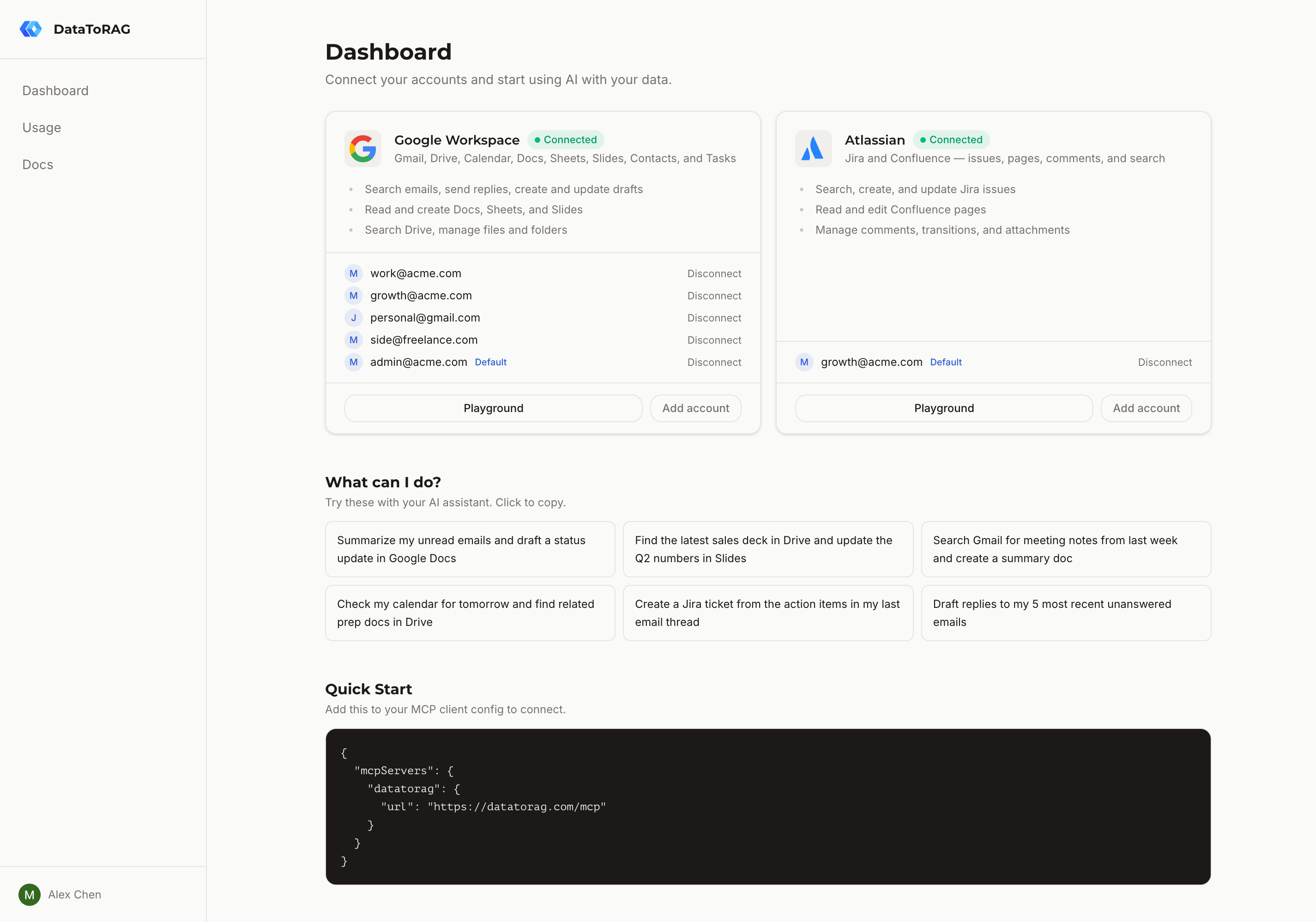
People kept asking for it. "I have a work Google account and a personal one. Can I search both?" The answer was no, because our entire auth model assumed one account per service per user. Fixing that touched every layer of the stack: database schema, token resolution, tool schemas, and the OAuth callback flow. Here's how we did it.
The old model and why it broke
Our service_connections table stored OAuth tokens with a unique constraint on (user_id, service). One user, one Google connection. That's it. The table was pure auth: refresh tokens, access tokens, expiry timestamps.
This worked fine until it didn't. A user connecting their work Gmail would overwrite their personal Gmail tokens. No warning, no merge. Just gone. The constraint made it structurally impossible to hold two sets of credentials for the same service.
Two tables, two jobs
We split the problem into two layers.
service_connections stays as the auth layer. It holds OAuth tokens and nothing else. We dropped the (user_id, service) unique constraint so it can store multiple token rows per service.
The new connected_accounts table is the routing layer. It maps a user-facing identity (an email address) to an auth row. Its unique constraint is (user_id, connector_type, account_email), which means you can connect as many Google accounts as you want, but you can't connect the same email twice. Each connected account has an is_default flag.
This separation matters. Auth concerns (token refresh, expiry) stay in one place. Identity and routing concerns (which account am I talking to?) live in another. When we eventually add Microsoft 365 or Slack, the same pattern works without modification.
Token routing in one query
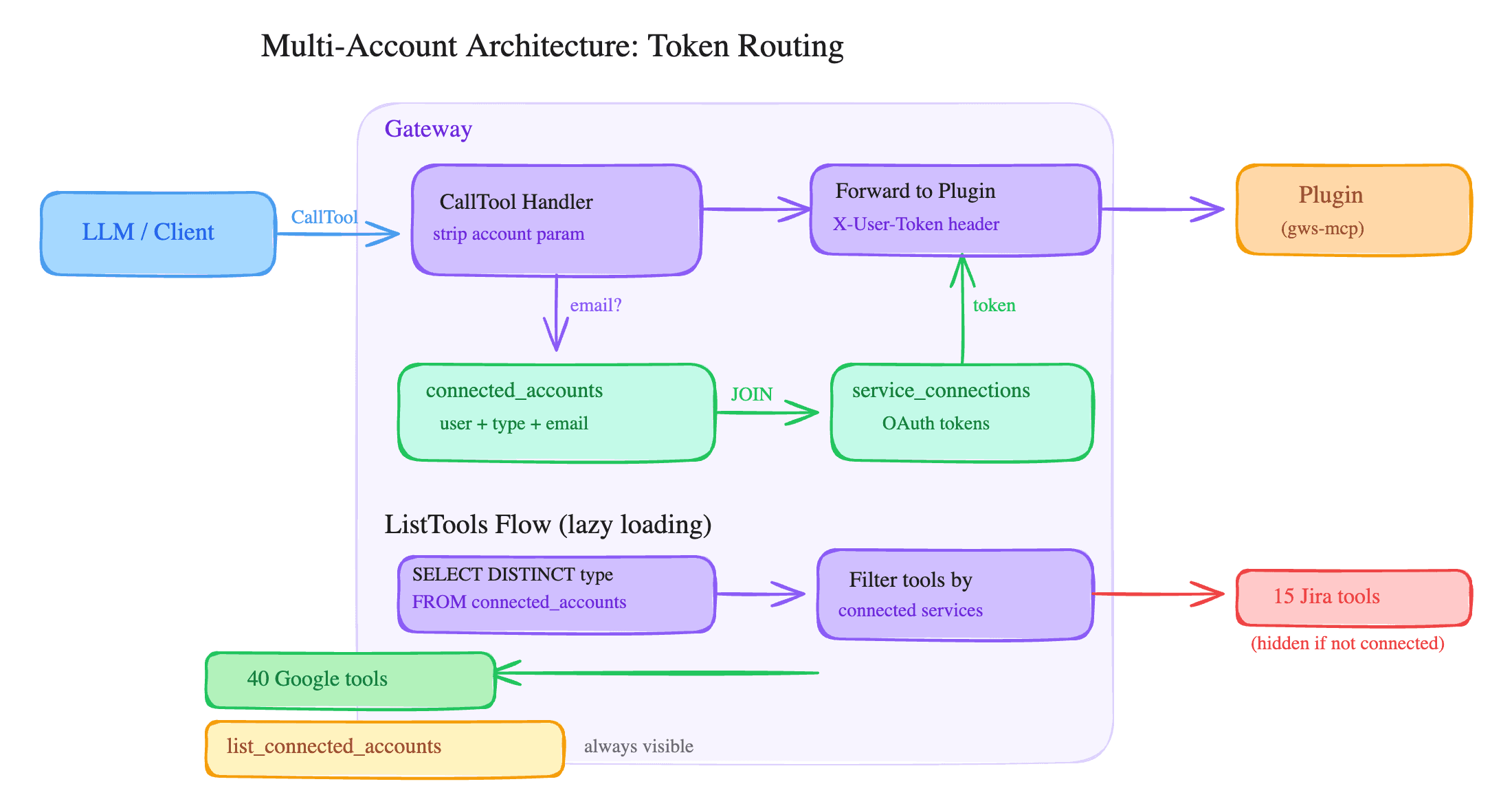
The core of the system is a single function: getServiceToken(db, userId, service, accountEmail?).
It runs a JOIN across connected_accounts and service_connections. If the caller passes an accountEmail, it matches on that. If not, it filters by is_default = true. One query, one result.
For backward compatibility, there's a fallback. If the JOIN returns nothing (which happens for users who connected before the migration), it falls back to a direct lookup on service_connections using the old (user_id, service) pattern. Existing single-account users don't notice any change.
Injecting the account parameter
Here's the part I like most. Plugins don't know about multi-account. They don't need to.
When the gateway handles a ListTools request, it injects an optional account parameter into every tool's inputSchema. The parameter description tells the LLM what it's for. When a tool call comes in with an account argument, the gateway strips it from the args, uses it to resolve the right token via getServiceToken, and forwards the remaining args to the plugin.
The plugin receives a valid access token and a clean set of arguments. It does its job. It has no idea which of your three Google accounts it's operating on. That's the gateway's problem, not the plugin's.
Telling the LLM what's available
We added a built-in tool called list_connected_accounts. It returns accounts grouped by connector type:
{
  "google-workspace": [
    { "email": "[email protected]", "is_default": true },
    { "email": "[email protected]", "is_default": false }
  ]
}
The LLM calls this when it needs to know which accounts exist. If a user says "check my personal email," the LLM can match "personal" to the right email and pass it as the account parameter. No disambiguation prompts, no confusion.
Lazy tool loading
This one was a side effect we didn't plan for. We started checking SELECT DISTINCT connector_type FROM connected_accounts WHERE user_id = ? at ListTools time. If you've only connected Google, we only return Google tools. Jira tools, Confluence tools: hidden.
The result is roughly 30% fewer tool definitions for single-connector users. That's less noise in the LLM's context window and faster tool selection.
The OAuth callback
When a user completes the OAuth flow, the callback handler fetches the connected account's email via the provider's userinfo API (/oauth2/v2/userinfo for Google, /me for Atlassian). It then creates rows in both service_connections and connected_accounts.
If the email already exists (re-auth scenario), it updates the tokens in place rather than creating duplicates. The unique constraint enforces this at the database level, but we handle it explicitly to avoid relying on upsert semantics.
The first account connected for a given service gets is_default = true automatically. Second and subsequent accounts default to false.
Default promotion
When you disconnect your default account, the oldest remaining account for that connector type gets auto-promoted. This runs inside a database transaction: delete the connected account row, delete the orphaned service connection, promote if needed. No window where a user has accounts but no default.
We considered letting users pick the new default interactively, but that would require an extra round-trip in the disconnect flow. Auto-promoting the oldest account is predictable and matches what most people expect.
What we shipped
The whole feature is about 400 lines of application code across 12 files. No breaking changes to the plugin API. No changes to existing user sessions. A user who connected one Google account before the update still has one Google account after, and everything works exactly as before.
The account parameter pattern is generic enough that any MCP server could adopt it. If you're building multi-tenant MCP tools, consider this approach: let the gateway own account routing, keep plugins stateless, and give the LLM a way to discover what's available.
Ready to connect your data to AI?
Give Claude write access to your Google Workspace. Start free, or talk to us about your setup.
Related articles
Before we built anything for write access, we read the threads. People complain about three things: connectors that won't change existing files, OAuth that eats DIY servers, and write access that sounds reckless. Here's each one, sourced, with what we did about it.
You Can Self-Host a Google Workspace MCP for Free. The OAuth Verification Is the Catch.The open-source Google Workspace MCP servers are genuinely good. The cost isn't the code. It's the Google Cloud project, the consent screen, and the verification that comes after.
One Prompt, Two Inboxes: Multi-Account Support for MCPMost MCP servers assume one user means one account. We built multi-account support so you can query your work and personal Google accounts in the same conversation.