
One Prompt, Two Inboxes: Multi-Account Support for MCP
Here's a scenario that kept coming up. You're in Claude, drafting a reply to a work email, and you need to find a receipt from your personal Gmail. You open a new browser tab, log into a different Google account, search for the receipt, copy the details, and paste them back into your conversation.
That's exactly the kind of thing MCP tools are supposed to eliminate.
The one-account assumption
Most MCP servers treat authentication as a solved problem: one user, one OAuth token, done. And for a lot of use cases, that's fine. But people don't live in one account. I've got a work Google account and a personal one. Some users have three or four. The moment you connect your work Gmail through an MCP server, your personal Gmail becomes invisible to the LLM.
We hit this wall ourselves while building DataToRAG. A user connected their corporate Google Workspace account, then asked, "Can you also check my personal email for that Amazon order confirmation?" The answer was no. Not because the protocol couldn't handle it, but because nobody had built the plumbing.
So we built the plumbing.
How it works
DataToRAG now supports connecting multiple Google accounts per service. The connect flow uses Google's select_account prompt, so when you add a second account, Google asks which one you want to link. No confusion, no accidentally re-authorizing the same account.
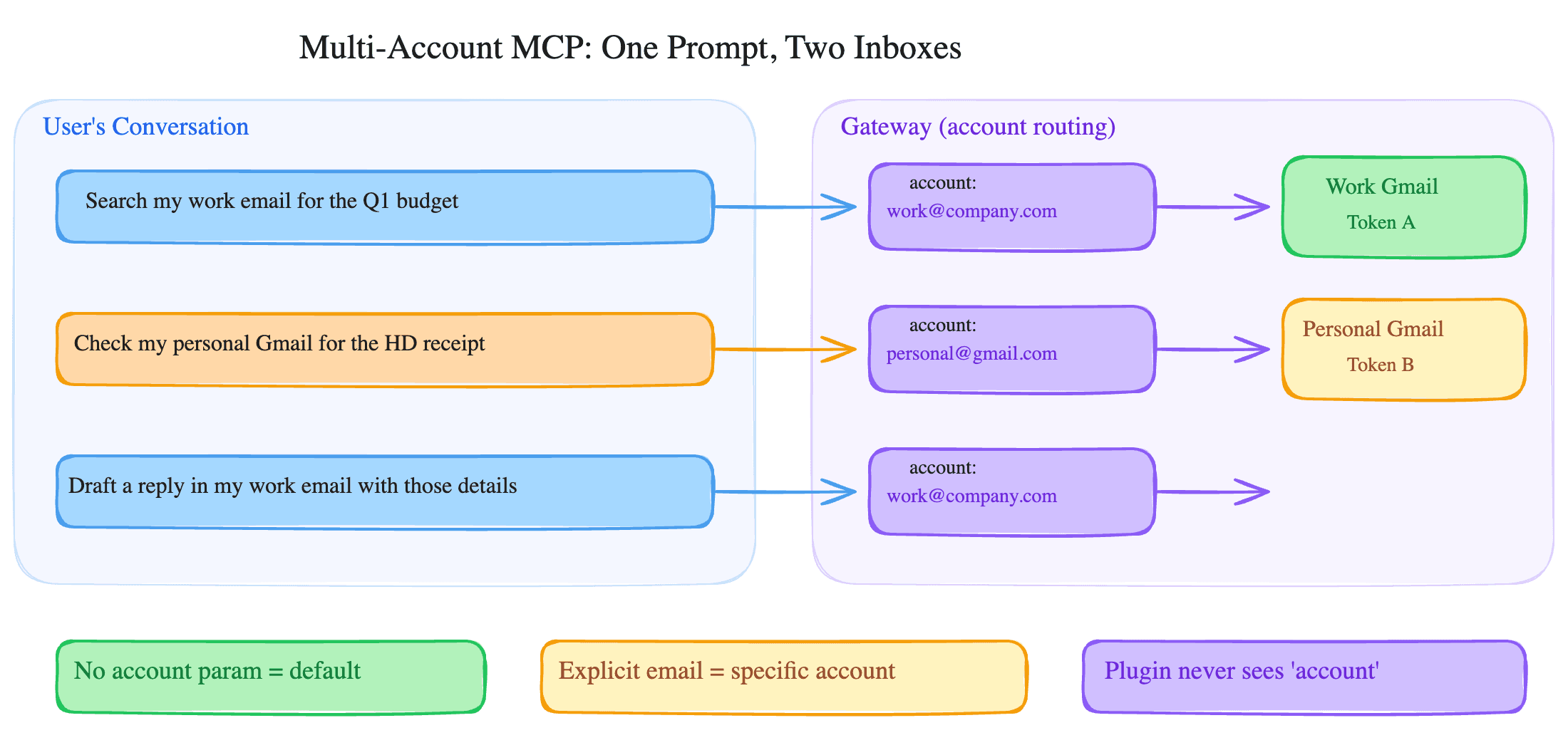
Every tool (search emails, list drafts, read documents) accepts an optional account parameter. It's just an email address. If you pass account: "[email protected]", the tool hits that account's API. If you omit it, the default account is used.
Single-account users never notice the feature exists. There's no extra configuration, no "select your account" step on every call. You connect one account, you use the tools exactly like before.
For multi-account users, the LLM figures it out from context. If you say "check my work email," Claude knows to use your work address. If you say "find that receipt in my personal Gmail," it passes your personal address. The list_connected_accounts tool lets the LLM discover which accounts are available at any point, so it doesn't have to guess.
Keeping the context window lean
Adding multi-account support raised a question we'd been thinking about anyway: tool sprawl.
DataToRAG connects to Google services (Gmail, Calendar, Drive, Docs, Sheets, Slides, Contacts, Tasks) and Atlassian services (Jira, Confluence). That's a lot of tools. If you've only connected Gmail, why should your LLM's context window include tool definitions for Jira, Confluence, Sheets, and everything else?
We added lazy tool loading. Tools for services you haven't connected are hidden from the MCP ListTools response entirely. They don't exist as far as the LLM is concerned. Connect Google Workspace only and every Atlassian tool disappears from the list. Connect Atlassian only and the whole Google surface goes. We deliberately do not put a percentage on it here, because the saving moves every time a tool ships or a connector is added, and a number printed in a blog post does not.
When you connect a new service, its tools appear automatically. Disconnect it, they disappear. The LLM always sees exactly the tools it can actually use.
| What you have connected | What the model sees |
|---|---|
| Google Workspace only | Gmail, Calendar, Drive, Docs, Sheets, Slides, Contacts and Tasks tools |
| Atlassian only | Jira and Confluence tools |
| Both | All of the above |
| Nothing yet | Only the tools that help you connect something |
This used to be a bar chart with the tool counts printed on it. The counts went stale, the way every figure we have published eventually does, and a number baked into an image cannot be caught by the tests that check our copy. The table says the same thing and stays true.
What this looks like in practice
A single conversation, two accounts:
You: "Search my work email for the Q1 budget spreadsheet from finance."
Claude calls gmail_search with account: "[email protected]" and query: "Q1 budget from:finance".
You: "Now check my personal Gmail for the Home Depot receipt from last week."
Claude calls gmail_search with account: "[email protected]" and query: "Home Depot receipt".
No tab switching. No copy-pasting. The LLM picks the right account based on what you asked for.
Other patterns we've seen: pulling company docs from a corporate Drive while referencing personal Google Docs notes. Checking a work calendar for meeting times, then a personal calendar for conflicts. Drafting in one inbox based on context from another.
The account parameter nobody talks about
The MCP spec doesn't have an opinion on multi-account scenarios. There's no standard for how tools should accept account identifiers, and most server implementations don't bother. We chose a simple email-address parameter because it's unambiguous, human-readable, and something LLMs already understand from context.
If you're building MCP tools and your users might have multiple accounts, consider this pattern. An optional account parameter with a sensible default covers both cases cleanly: single-account users get zero friction, multi-account users get full control.
Multi-account support is live now in the Google Workspace MCP. Connect your accounts and try: "Search my personal Gmail for flight confirmations."
Ready to connect your data to AI?
Give Claude write access to your Google Workspace. Start free, or talk to us about your setup.
Related articles
The database changes, token routing, and tool schema tricks behind supporting multiple Google accounts in a single MCP server.
Why Your MCP Server Is Eating Your Context WindowA Google Doc produces 50KB of JSON through the API. Your AI assistant doesn't need 98% of it. Most MCP servers send it all anyway.
Your Agent Can Attach Files to Email Now. The Interesting Part Is Where the Bytes Never Go.Gmail send, reply, forward and drafts take attachments from Drive: real files attached, Google Docs linked the way Gmail does it or exported as PDF and Word, images inline. The design question underneath is one the MCP spec itself hasn't settled yet, and we picked a side.