
Why Your MCP Server Is Eating Your Context Window
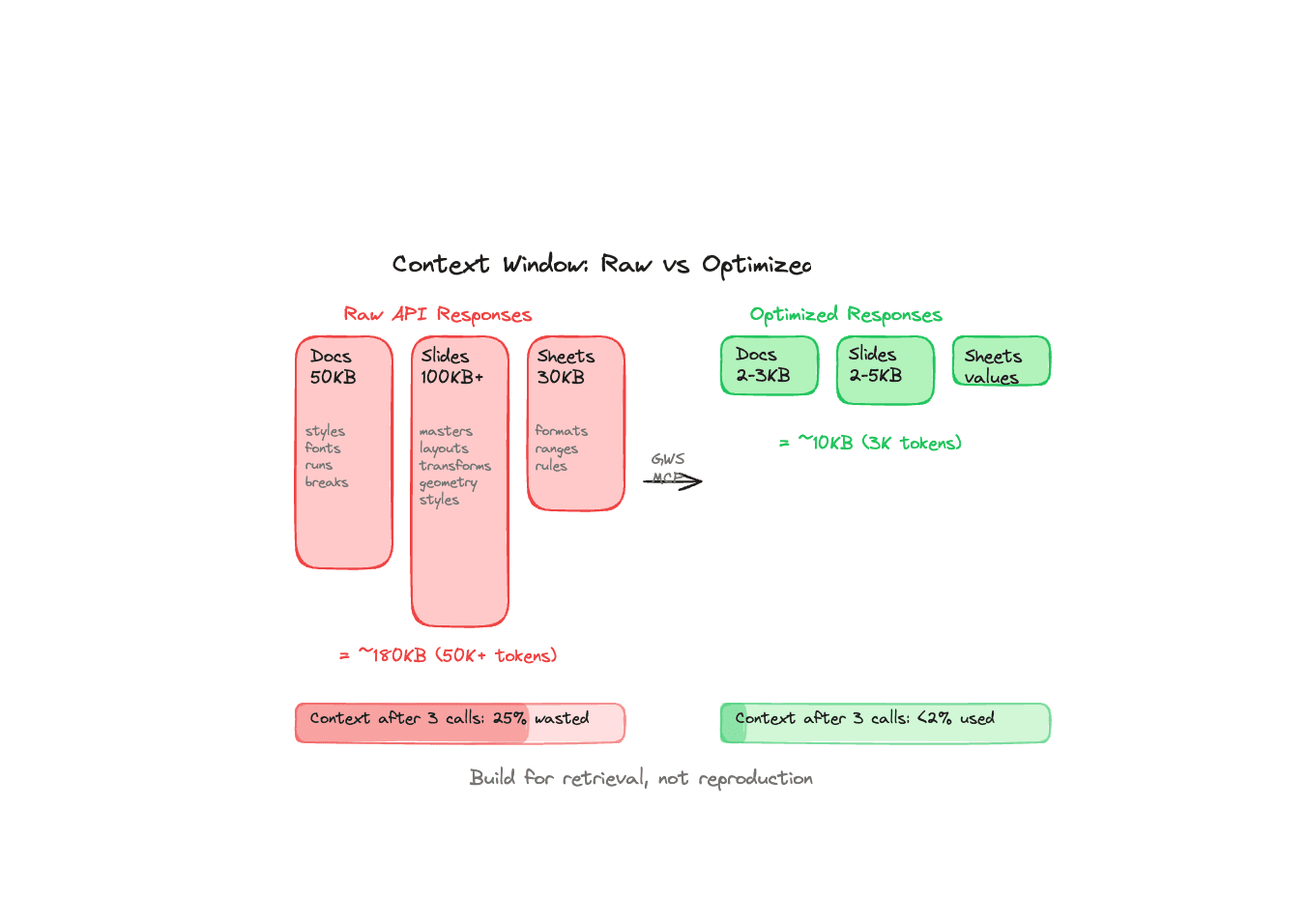
Every tool call in an MCP conversation consumes tokens. The response goes into the context window, sits there for the rest of the conversation, and counts against the limit on every subsequent turn. This is obvious if you think about it. Most MCP server authors don't think about it.
The result is what I've started calling context rot. Your AI assistant works fine for the first two or three tool calls, then starts losing track of the conversation, dropping details, or giving vague answers. The context window isn't full in the traditional sense. It's polluted.
The raw API problem
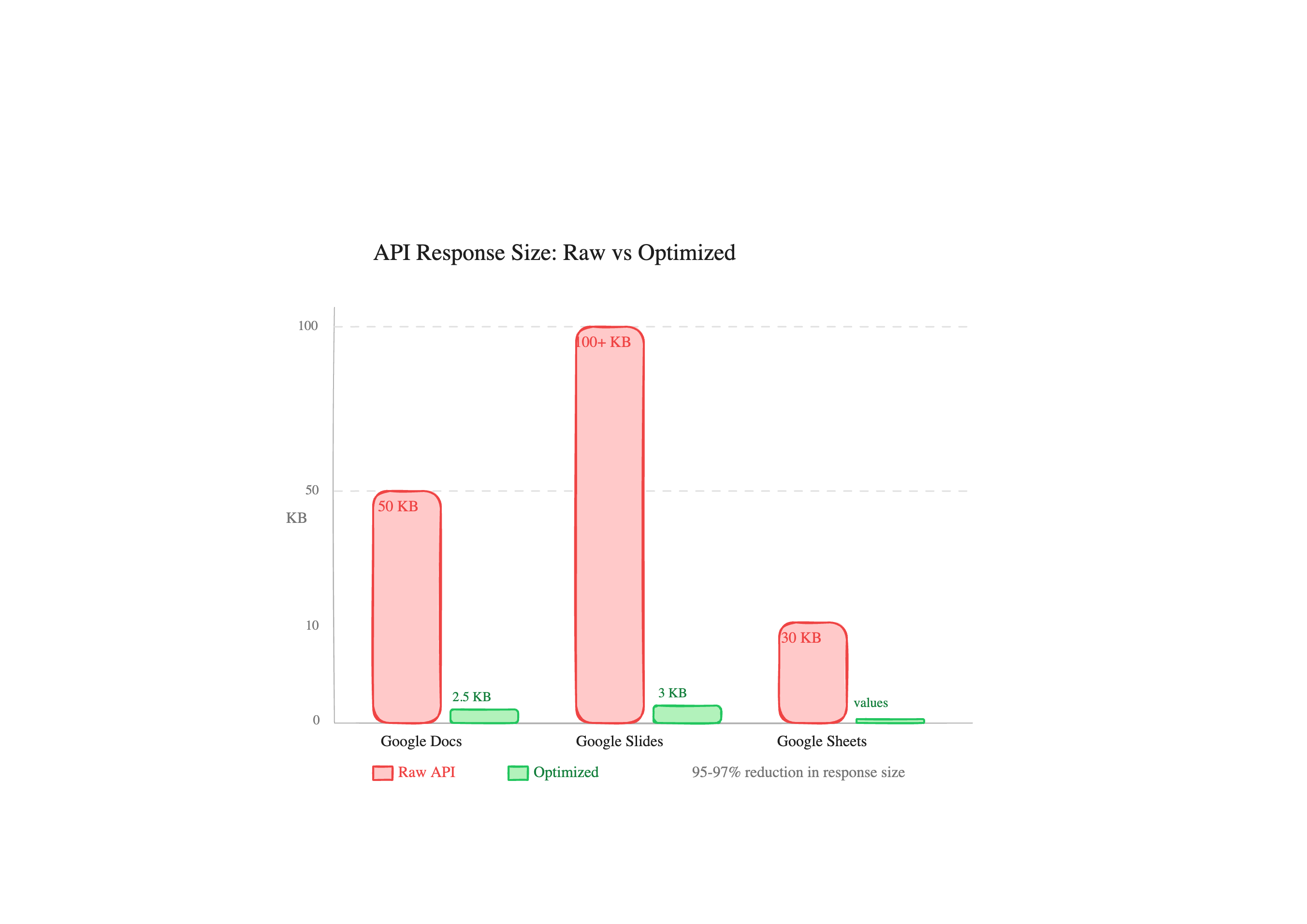
Pull a 2-page Google Doc through the Docs API. The JSON response is typically 50KB or more. Most of that is paragraph styles, named styles, text runs with font metadata, positioning info, section breaks, document-level settings. The actual text content is maybe 2-3KB buried inside nested objects.
Slides are worse. A 10-slide presentation easily produces 100KB+ of JSON. Each slide includes master references, layout references, page element geometry (position, size, transform matrices), shape properties, text style runs, and link metadata. The content you care about, the words on the slides, might be 3KB.
Sheets are the one exception where the raw API is reasonably sized, because spreadsheets.values.get returns just the cell values without formatting. But even there, if you accidentally hit the full spreadsheets.get endpoint, you're pulling sheet properties, conditional formatting rules, named ranges, and developer metadata.
What 50KB of context pollution actually costs
Let's do rough math. Claude's context window is 200K tokens. 50KB of JSON is roughly 15,000-20,000 tokens. Two Google Doc reads and a slides read later, you've burned 50,000+ tokens on data the model will never meaningfully use. That's 25% of the context gone.
But it's not just about capacity. Dense JSON with deeply nested objects is hard for language models to parse efficiently. The model spends attention on structural tokens (braces, brackets, key names) that carry no semantic value. The signal-to-noise ratio tanks.
In practice, we found that multi-step workflows with raw API responses started degrading after 2-3 tool calls. The same workflows with optimized responses stayed coherent through 10 or more.
How we handle it
Three approaches, depending on the service.
Google Docs has a text mode that flattens the document to plain text. 2-3KB instead of 50KB+. We also have an index mode that includes character positions (startIndex/endIndex) for when you need to make positional edits. Still compact, but gives the model what it needs for insert and delete operations. The full raw response exists for debugging, but you almost never want it.
Google Slides runs through a trimPresentation() function that strips master slides, layouts, page element geometry, transform matrices, and text styling. What comes back is the slide structure with just the text content and object IDs you'd need for edits. 2-5KB from 100KB+ raw.
Google Sheets hits spreadsheets.values.get directly, never fetching the full spreadsheet resource with formatting, conditional rules, and metadata. If you need cell values, that's what you get. Nothing else.
Every response also has a 900KB safety cap. If something somehow produces a massive response (a Sheet with 50,000 rows, say), it gets truncated with a note rather than blowing out the context.
The design principle
We're building for retrieval, not reproduction. The AI doesn't need a pixel-perfect representation of your Google Doc. It needs the text, maybe the structure, and enough metadata to take actions. Everything else is waste.
This sounds obvious, but look at most open-source MCP servers. They call the API, serialize the response to JSON, and return it. That's the whole implementation. It works for demos. It falls apart in real workflows where you're chaining 5-10 tool calls together to actually get something done.
The difference between a demo and a product is whether it still works on the fifth tool call.
What to watch for if you're building MCP servers
Keep responses under 5KB when possible. If an API returns rich objects, extract just the fields the model needs for its task. Include IDs and references the model would need to take follow-up actions, but drop display metadata, styling, and structural boilerplate.
Test your server by running a 10-step workflow, not a single tool call. That's where context management problems show up. The first call always works. It's call number seven where things get interesting.
Ready to connect your data to AI?
Give Claude write access to your Google Workspace. Start free, or talk to us about your setup.
Related articles
Confluence storage format is verbose XML that destroys context windows. We convert it to clean text by default, with a format switch for when you need the raw markup back.
One Prompt, Two Inboxes: Multi-Account Support for MCPMost MCP servers assume one user means one account. We built multi-account support so you can query your work and personal Google accounts in the same conversation.
Your Agent Can Attach Files to Email Now. The Interesting Part Is Where the Bytes Never Go.Gmail send, reply, forward and drafts take attachments from Drive: real files attached, Google Docs linked the way Gmail does it or exported as PDF and Word, images inline. The design question underneath is one the MCP spec itself hasn't settled yet, and we picked a side.