
Confluence Pages Are 40KB of Markup. Your AI Gets 2KB.
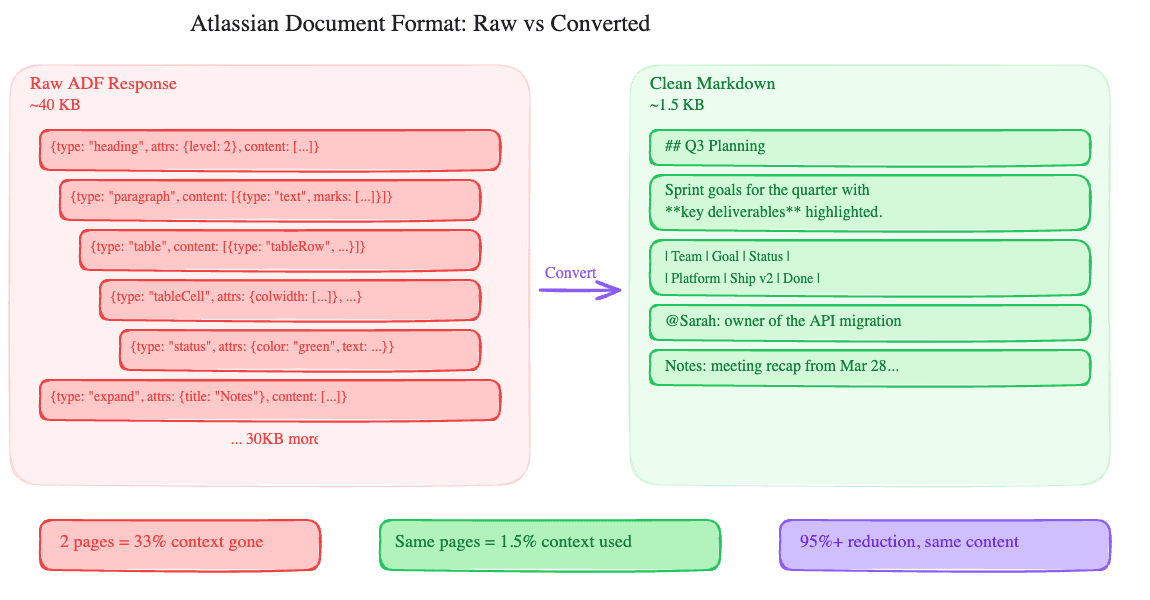
Pull a Confluence page through the REST API. What comes back is XHTML storage format: a verbose XML document with Confluence-specific macros, layout tags, and structural metadata baked in. A 500-word page with a table, a few headings, and an inline image produces roughly 40KB of markup.
Your AI assistant doesn't need any of it. It needs the text.
What storage format looks like
Confluence stores page content as XHTML with custom XML namespaces for macros, mentions, images, and Atlassian-specific elements. A bold word inside a paragraph is straightforward HTML (<strong>word</strong>), but the real bloat comes from macros, layout sections, and structured elements.
A status badge? That's an <ac:structured-macro ac:name="status"> with nested parameter nodes. An expand section? Another structured macro wrapping an <ac:rich-text-body> containing the collapsed content. A table with column widths, header styles, and merge cells generates deeply nested XHTML that's 10-20x the size of the actual cell text.
Scale that across a real Confluence page (the kind engineering teams actually build, with panels, decision tables, Jira links, and collapsible meeting notes) and you get 30-50KB of XHTML where maybe 1-2KB is the text someone would actually read.
Why this matters for MCP
We wrote about this problem with Google Docs and Slides in a previous post. The same math applies here, possibly worse. Confluence storage format is more verbose than Google's response for equivalent content because every macro, layout column, and rich element adds layers of XML nesting.
Two Confluence page reads at 40KB each burn somewhere around 25 to 40 thousand tokens, and most of that is structural markup the model will never use meaningfully. Whether that is a fifth of your context or a fortieth depends on the model you are on, which is exactly why we count it in tokens spent rather than as a share of a window that keeps moving. Either way it is attention budget going on XML tags and macro attributes instead of on the content.
We saw this in testing. A workflow that read three Confluence pages and summarized them started losing coherence by the second page when using raw storage format. The same workflow with converted text stayed sharp through all three and still had room for follow-up questions.
How we handle it
The confluence_get_page tool accepts a format parameter with two modes:
format: "text" (the default) converts the XHTML storage format to clean, readable text. Headings become ## Heading Text. Tables become markdown tables. Mentions become @Display Name. Code blocks keep their content. Images are noted as [image: filename] so the AI knows something was there without eating context. Confluence macros (panels, expand sections, status badges) get stripped to their text content.
The result: a 40KB storage response becomes 1-2KB of readable text. That's a 95%+ reduction.
format: "storage" returns the raw XHTML storage format, unchanged. Use this when the AI needs to edit the page with confluence_edit_page, because the edit tool requires XHTML storage format for write-back.
The workflow for reading is simple: call confluence_get_page with no format parameter (or format: "text") and get clean content. The workflow for editing: call with format: "storage" to get the full markup, have the AI modify it, then write it back with confluence_edit_page.
This gives you the best of both worlds. Reading costs almost nothing. Editing preserves full fidelity because the AI works with the original markup structure, not a lossy round-trip through text conversion.
The editing tradeoff
To be clear about what each mode costs:
Text mode is lossy. You can't round-trip it. If you read as text and tried to reconstruct the storage format, you'd lose panel types, status badge colors, macro configurations, and table column widths. That's fine for 90% of interactions (reading, summarizing, searching, extracting data) and it's why text is the default.
Storage mode preserves everything but costs context. A heavily formatted page will consume 30-50KB of your context window. For a focused edit (change one date in a table, update a status badge), that's an acceptable trade. For reading five pages and writing a summary, it's wasteful.
What works well in each mode:
Text mode: summarizing pages, answering questions about content, finding information across multiple pages, creating new pages from scratch, adding comments.
Storage mode: updating specific sections, changing formatted elements (status badges, table cells), editing pages that use complex macros, any workflow where the page needs to look the same after the edit.
Jira is cleaner, but not clean
Jira issue descriptions also use Atlassian's structured format, though they tend to be shorter. A typical issue description might be 5-10KB for a few paragraphs of text. We apply similar trimming.
The bigger win on the Jira side is cutting the issue metadata. A full Jira issue response includes changelog history, rendered fields, schema definitions, edit metadata, and the full project configuration. We return the fields people actually ask about: key, summary, status, priority, assignee, reporter, description, labels, created and updated dates, a comment count, and attachments. Comment bodies are a separate call, so a summary of an issue does not drag every thread on it into context. The rest is noise.
The pattern
This is the same approach we use across every connector. Raw API responses are designed for applications that need pixel-perfect rendering or full write-back capability. An AI assistant needs neither for most tasks.
For Confluence: text mode by default for reading, storage mode on demand for editing. For Google Docs: text mode for reading, index mode for positional edits. The principle is the same: give the LLM the cheapest representation that gets the job done, and offer the full-fidelity version when it's actually needed.
If you're building an MCP connector for any service that returns rich document formats (Notion's block API has the same problem), think about the read/write split. Don't force a choice between context efficiency and write fidelity. Offer both.
Try it
The Atlassian MCP connector is live in DataToRAG. Connect your Jira and Confluence accounts from the dashboard. Try: "Summarize the Engineering onboarding page in Confluence." The response will be clean text, not a wall of XML.
Ready to connect your data to AI?
Give Claude write access to your Google Workspace. Start free, or talk to us about your setup.
Related articles
The Atlassian connector isn't two separate integrations. It's the cross-product workflow that always lived in a Google Doc.
Why Your MCP Server Is Eating Your Context WindowA Google Doc produces 50KB of JSON through the API. Your AI assistant doesn't need 98% of it. Most MCP servers send it all anyway.
Claude Can File an Email on a Jira Issue Now, Without the Email Going Through ClaudeOne customer needed every email on a Jira issue as the original .eml, for compliance. He was doing it by driving Chrome. Now it is one tool call, the file goes from Gmail to Jira without touching the conversation, and the answer is a receipt with a hash. The design underneath is a file reference, and it is the shape every cross-service tool we build from here will take.