
Pipedream Wants You to Build the Integration. DataToRAG Is the Integration.
Someone in a Slack group I'm in swore Pipedream was the fastest way to give Claude access to Gmail and Google Sheets. So I spent an afternoon in the Pipedream MCP docs. They were half right. By the end I had a working setup, and a realization I hadn't expected: I never connected my own Google account to Claude. I'd built the start of a product that would let other people connect theirs.
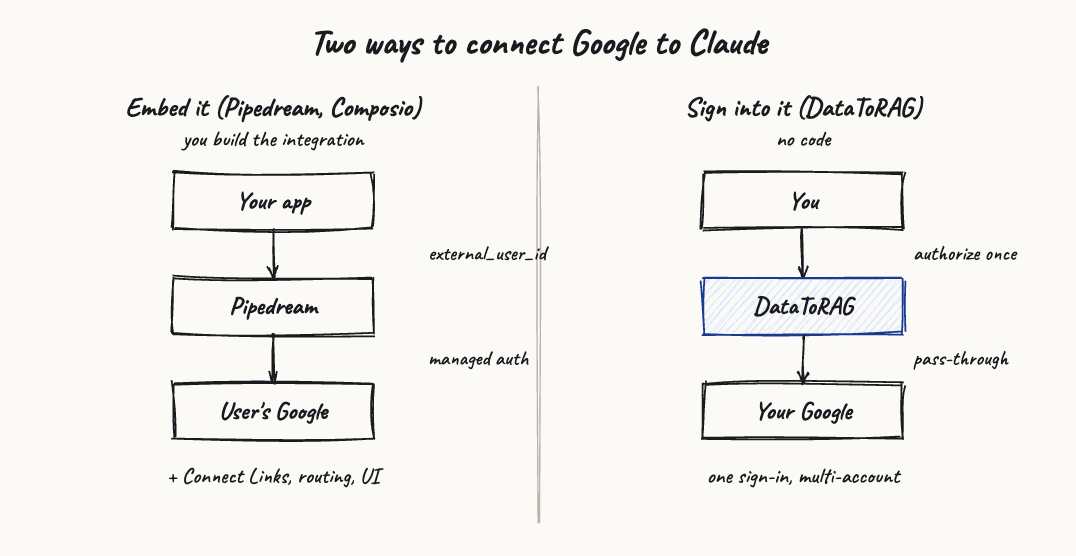
That's the core of the Pipedream versus DataToRAG decision, and it's worth getting straight before you commit. Both put a Model Context Protocol (MCP) server in front of your tools, so they look like the same kind of thing. They're answers to different questions. Pipedream answers "how do I let my users' agents act inside their apps, from the product I'm building?" DataToRAG answers "how do I let Claude act in my Google Workspace, right now?"
The external_user_id tell
The quickest way to see the difference is one parameter. Pipedream Connect routes every request with a header called x-pd-external-user-id. That value is the ID of one of your users, in your system. You generate a Connect Link, your user opens it and authorizes Google, and Pipedream stores that token keyed to the external user you named. From then on your backend, or an agent you run, makes MCP calls on that user's behalf, tagging each one with their ID and an app slug like gmail or google_sheets.
If you're building a SaaS app that needs to act inside your customers' Gmail, this is close to ideal. Pipedream holds the tokens, runs the OAuth handshake, refreshes credentials, and hands you a clean per-user boundary. You don't build an auth system. You don't store refresh tokens. That's real work you get to skip.
Now read that flow again as a person who just wants Claude to clear their inbox. You are the developer. You create a project, register credentials, pick an external user ID (for an audience of one: you), wire routing headers, and surface a Connect Link to yourself. You've stood up a small multi-tenant product with exactly one tenant. It works. It's also a lot of scaffolding to read your own email.
DataToRAG removes the scaffolding because it removes the abstraction. There's no external user ID, because you are the user. You open the dashboard, sign in with Google, and Claude can use the tools. The thing Pipedream gives you a kit to build, DataToRAG already is.
Feature comparison
| Capability | Pipedream Connect / MCP | DataToRAG |
|---|---|---|
| An end user can sign in and use it without writing code | No, a developer builds the integration first | Yes |
| Self-host the entire platform | No, cloud only | Yes, MIT (Docker + PostgreSQL) |
| Deep Google Workspace actions out of the box | Broad but shallow per app, with a custom-API fallback | Yes, all eight services |
| Google and Atlassian behind one endpoint | You wire up each app yourself | Yes, one endpoint |
| Work and personal Google in a single prompt | Possible, but you build and host it | Yes, from the dashboard |
| How you're billed | Compute-metered credits | Usage based, pass-through |
| Credentials and execution can stay off a vendor's servers | No, they transit Pipedream | Yes, when you self-host |
What DataToRAG ships that you'd otherwise assemble
Pipedream's breadth is real, but breadth and depth aren't the same thing. Its Google coverage is wide and thin. Gmail, for example, exposes a small set of pre-built actions and leans on a generic "make an API request" action for anything past them, which pushes the work of shaping the Gmail API onto your agent. That's fine for a one-off automation. It's frustrating when you want Claude to actually run an inbox.
DataToRAG hand-builds the verbs instead. Gmail alone has gmail_search, gmail_read, gmail_send, gmail_reply, gmail_forward, gmail_mark_read, gmail_save_attachment_to_drive, and a full label surface for filing threads once you have acted on them. Docs get docs_batch_update for editing a document in place, not just creating one. Sheets get sheets_update and sheets_append. Slides get slides_batch_update. There are full tool sets for contacts_* and tasks_*, two surfaces a lot of platforms skip entirely. That's Gmail, Calendar, Drive, Docs, Sheets, Slides, Contacts, and Tasks, plus Jira and Confluence, all behind one sign-in.
The responses are tuned for tokens, too. A raw Google API payload is mostly metadata Claude doesn't need. DataToRAG trims it before it reaches the model, so the context window goes to the actual work instead of JSON you'll never read.
What Pipedream is genuinely great at
I don't want to be cute about this. If your problem is the one Pipedream is built for, it's an excellent answer, and probably a better one than us.
A few things stand out. The breadth, first: thousands of apps and tens of thousands of pre-built tools, far more than any single-suite gateway will ever carry. If your agent needs Salesforce and Notion and Shopify and a long tail of niche APIs, that catalog is hard to beat. Then the embedded auth. Connect is some of the best managed, per-user OAuth I've seen, and if you're shipping to a lot of customers it probably saves you months. And compliance: SOC 2 Type II and a HIPAA BAA are available, which matters the moment you're holding other people's regulated data at scale.
So the rule of thumb is simple. Pick Pipedream when you're the one building the product. Pick a gateway you sign into when you're the one using it.
A word on cost shape
Pipedream meters compute. You spend credits as actions run, and an agent that polls, retries, and chains tool calls runs a lot of actions. That isn't a knock. Metered compute is a fair model, and for steady workloads it's predictable enough. But a chatty Claude session can burn through more than you'd guess, and the cost of "let me just check that one more time" adds up in a way a usage-simple, pass-through model doesn't. Model it against your real usage before you commit, in either direction. The point isn't that one is always cheaper. It's that the two bill on different axes, and a conversational agent leans hard on the axis Pipedream charges for.
Where the difference actually bites
Here's the scenario that makes it concrete. You run ops at a mid-size company. You've got a work Google account, a personal one, and access to a shared team inbox, and you want Claude to triage all three in a single prompt, then update a tracking sheet and edit a planning doc. You also don't want to write code or host anything, and your security team would rather the data never leave infrastructure they control.
With Pipedream you'd build the Connect integration, manage external user IDs (even just for yourself and the shared inbox), watch credit burn as a triage agent fires call after call, and accept that credentials and execution run through Pipedream's cloud, because the platform itself doesn't self-host. None of that is a dealbreaker. It's just a project, and you have a day job.
With DataToRAG you open the dashboard, connect the three Google accounts, and prompt across them. gmail_search runs against all of them or just one, your choice. sheets_append updates the tracker. docs_batch_update edits the doc. If the security team wants the data on their own servers, you run the same MIT-licensed gateway with Docker and Postgres, and nothing transits us at all.
That last point is the one I'd weigh hardest for regulated Google data. Pipedream's compliance posture is strong, but strong vendor compliance and "the data never touches a vendor" are different guarantees. Self-hosting gives you the second one.
The honest summary
Pipedream Connect is plumbing for builders. DataToRAG is a gateway you sign into. If you're embedding tool access into a product for your own users, Pipedream's breadth and embedded auth are hard to argue with, and I'd point you there. If you're a person or a team who wants Claude to do real work across Google Workspace and Atlassian, with deep tools, multi-account in one prompt, and the option to host it yourself, you shouldn't have to build a product to get there.
If you want the wider view, I lined up every option for connecting Claude to Google Workspace in this roundup, native connectors included. Choosing between Pipedream and Composio for an agent product? That direct comparison is here.
Try it
Connect your Google account at datatorag.com/dashboard. If you've got more than one account, connect them all and try triaging both inboxes in a single prompt. That's the demo that makes the difference obvious.
Ready to connect your data to AI?
Give Claude write access to your Google Workspace. Start free, or talk to us about your setup.
Related articles
Both sell developers a way to wire their users' apps into an agent product. Composio leans on per-user MCP URLs, Pipedream on external user IDs and Connect Links. Here's how they differ, and the question to ask before you pick either.
Composio Is for the Developer Shipping an Agent. DataToRAG Is for You.Composio is a strong platform for developers wiring tools into agent products. If you just want Claude working in your own Google account, you'd have to write code to get there. DataToRAG is the part you sign into.
Composio vs Zapier MCP: Two Different Bets (and the Question Neither Answers)Composio is integration infrastructure for developers shipping agents. Zapier MCP is automation breadth for people who already live in Zaps. If the actual question is 'how do I get Claude working deep in my Google Workspace', both answers come up short.