
Zapier MCP Connects 9,000 Apps. We Went Deep on Google Workspace Instead.
The pitch for Zapier MCP is hard to argue with. One connection, and your AI assistant can touch nine thousand apps. Gmail, Slack, Notion, Salesforce, some CRM you forgot you signed up for in 2019. It's the widest set of tools you can hand Claude in about five minutes, and it works across Claude, ChatGPT, Cursor, and the rest.
So I tried to do real work with it, on Google Workspace, which is where my actual day happens. I asked Claude to take a messy meeting-notes doc, restructure it into proper sections with headings, and then build a short slide deck from the summary. That's where it hit a ceiling, pretty fast. Claude could append a paragraph to the bottom of the doc. It could run a find-and-replace. It couldn't restructure the document the way you'd actually edit one, and the deck wasn't happening at all.
The breadth was real. The depth wasn't there. That gap is the whole reason DataToRAG exists, so let me be specific about it instead of hand-waving.
Why Zapier's Google actions stay shallow
This isn't Zapier being lazy. It's the shape of the product.
Zapier MCP exposes the same actions Zapier built for Zaps, and Zaps are automation steps: when X happens, do one discrete thing. Send an email. Add a row. Create a draft. Those are good automation primitives. As editing tools, they're thin.
Google's own APIs expose a batchUpdate operation for Docs and Slides. It's the call that lets you make structural changes: insert a heading, move a block, restyle a range, build a table, lay out a slide. Zapier doesn't surface that. You get the coarse, prepackaged actions it chose to expose, and nothing underneath them. One comparison I read put it well: Zapier exposes only what it decides to expose, and you can't reach past it.
There are coverage gaps too. Gmail, Docs, Sheets, Drive, and Calendar have genuine write actions on the MCP surface. Slides, Contacts, and Tasks don't, at least not as of mid-2026. So any workflow that ends in a deck, touches your contacts, or files follow-up tasks runs out of road partway through.
Feature comparison
| Capability | Zapier MCP | DataToRAG |
|---|---|---|
| Total apps reachable | 9,000+ | Google Workspace + Atlassian |
| Gmail: send / reply / forward | Yes | Yes |
| Docs: structural editing (batch update) | No (append, find-and-replace only) | Yes |
| Sheets: read / update / append | Yes (row-level) | Yes (cell and range) |
| Slides: create / edit decks | Not on MCP surface (mid-2026) | Yes |
| Contacts: search / create / update | Not on MCP surface (mid-2026) | Yes |
| Tasks: create / complete / update | Not on MCP surface (mid-2026) | Yes |
| Multi-account in one prompt | Not documented | Yes |
| Atlassian (Jira + Confluence) | Via separate Zaps | Same endpoint |
| Token-optimized responses | No | Yes |
| Self-host / open source | No (cloud-only, closed) | Yes (MIT) |
What DataToRAG's Google tools add
DataToRAG goes the other direction. Instead of one shallow action per app across thousands of apps, it ships hand-built tools across the eight Google Workspace services, built to match what the APIs can actually do. A few that matter here:
docs_batch_update: edit a document in place. Insert headings, replace ranges, restyle text, build tables. Not just append to the end.slides_createandslides_batch_update: build a deck and modify it, slide by slide.sheets_update,sheets_append,sheets_read: work at the cell and range level, not just "add a row."- the
contacts_*set for searching, creating and updating your contacts. - the full
tasks_*set, so a workflow can file the follow-ups it just decided on instead of handing them back to you.
And because it's one endpoint, the same prompt can spill over into Atlassian. Jira and Confluence ride behind the same endpoint, so "turn these notes into a Confluence page and open three Jira tickets" is one conversation, not three.
Depth has a hidden cost that's worth calling out: deep tools can return enormous payloads. A single Confluence page is tens of kilobytes of markup. A Google Sheet read can dump rows you didn't ask for. DataToRAG's responses are tuned for token efficiency, so Claude gets the content and not the wrapper, and you're not burning context window on API noise. Depth, without the bloat that usually rides along with it.
What Zapier MCP is genuinely great at
I want to be fair, because Zapier MCP is excellent at the thing it's built for.
If your work spans dozens of niche SaaS tools, nothing else reaches as far. Nine thousand apps is not a number a focused gateway will ever match, and honestly it shouldn't try. A few things Zapier does that I respect:
Zero-config auth. Zapier already holds your app connections, so there's nothing to wire up. You point Claude at one server URL and you're done.
No separate MCP bill. It rides on a plan you might already pay for.
And a serious compliance track record: SOC 2 Type II, years of security work, a real trust program. On general-purpose attestations they're ahead of us, and I'm not going to pretend otherwise. Where we've caught up is the Google-specific bar: we passed CASA Tier 2 and Google verified the app in June 2026.
If breadth across the long tail of SaaS is your problem, Zapier MCP is the answer, and I'd point you straight at it.
Where the gap bites
Here's the workflow that made the difference concrete for me.
Take a 2,000-word meeting-notes doc. Restructure it into sections with proper headings. Pull the decisions into a summary at the top. Build a five-slide deck from that summary. Then file a follow-up task for each owner mentioned in the notes.
On Zapier MCP, Claude reads the doc (fine) and appends a summary to the bottom (fine). Then it stops. It can't restructure the document, it can't build the deck because Slides isn't on the MCP surface, and it can't file the tasks because Tasks isn't either. You get a half-finished job and a checklist of things to do by hand.
On DataToRAG, the same prompt runs end to end. docs_batch_update restructures the document. slides_create builds the deck. tasks_create files one task per owner. One conversation, no clicking through three apps afterward.
That's not a knock on automation. It's the difference between a tool that triggers single actions and a tool that finishes multi-step work inside one suite.
The tell is what happens at the handoff. With Zapier MCP, Claude does the thinking and then narrates the parts it can't do, and you finish them in Google Docs and Slides yourself. With a deep gateway, the thinking and the doing live in the same conversation. For a one-off that's a nice-to-have. For something you run every Monday, it's the difference between a tool you trust and a tool you babysit.
The cost that hides in chatty agents
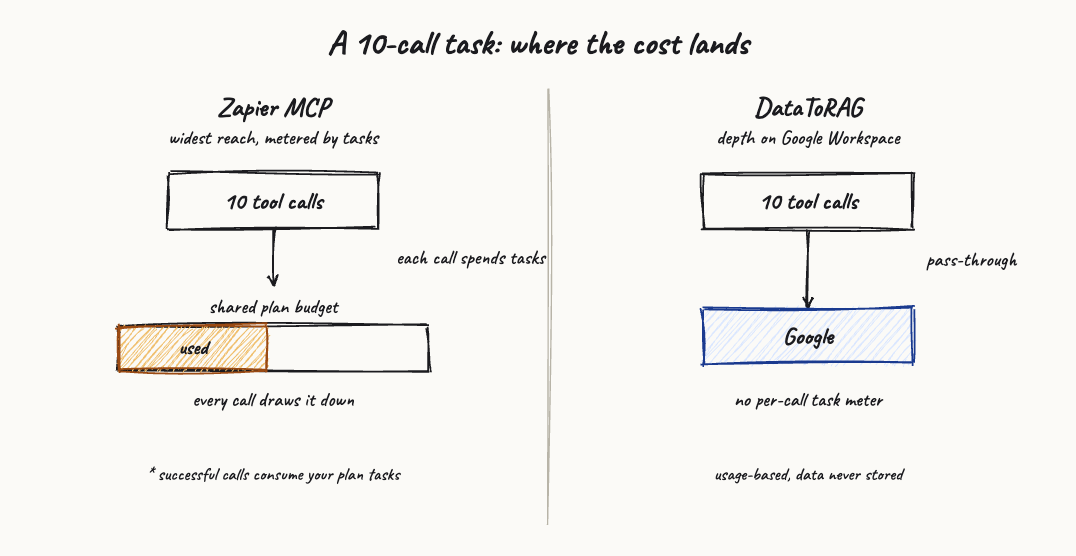
There's a quieter difference worth naming. Every successful Zapier MCP call spends tasks from your plan's shared budget. For a person clicking through Zaps now and then, that's a non-issue. For an agent that fires a dozen tool calls to finish one request, it adds up faster than you'd guess, and it draws down the same budget your other automations use.
DataToRAG passes requests straight through to Google on your behalf, and the gateway keeps nothing on the way. One caveat, because the unqualified version of this line was too broad: if you use the hosted agent on our own site, that conversation is stored so the thread persists, and whatever the agent quoted into it is stored with it. Connect your own client straight to the gateway and that does not apply. The privacy policy states what is kept and for how long. The economics are different because the architecture is different.
If you live in two Google accounts
One last thing, because it bites a lot of people. Connecting both your work and personal Gmail and having Claude reason across them in a single prompt isn't documented for Zapier MCP. With DataToRAG it's built in: you connect every account under one endpoint, and Claude can target one or search across all of them. I wrote up how that works in one prompt, two inboxes.
The honest summary
Zapier MCP is the widest tool you can give Claude. DataToRAG is the deepest one for Google Workspace specifically. My read: if your bottleneck is reaching a hundred different apps, go wide. If it's getting real work done inside Docs, Sheets, Slides, Gmail, Contacts, and Tasks, go deep.
If you want the full menu, including the native Claude connectors and the self-hosted route, I put together a roundup of the Google Workspace MCP alternatives. And if you're weighing Zapier MCP against Composio specifically, that head-to-head is here.
Try it
Connect your Google account at datatorag.com/dashboard and run the meeting-notes prompt above on both setups. It either finishes the job, or it hands you a to-do list. That's the whole test.
Ready to connect your data to AI?
Give Claude write access to your Google Workspace. Start free, or talk to us about your setup.
Related articles
Google shipped eight official Workspace MCP servers. Claude has three native connectors. We host one endpoint. Every tool on all three, enumerated on August 24, 2026, including the surprise: Google's own Gmail MCP cannot send email.
Composio vs Zapier MCP: Two Different Bets (and the Question Neither Answers)Composio is integration infrastructure for developers shipping agents. Zapier MCP is automation breadth for people who already live in Zaps. If the actual question is 'how do I get Claude working deep in my Google Workspace', both answers come up short.
Every Way to Connect Claude to Your Google Workspace, Compared (2026)Native connectors, Zapier MCP, Composio, Pipedream, a self-hosted open-source server, or DataToRAG. What each one really does with your Google data, and how to pick the right one.