
You Can Self-Host a Google Workspace MCP for Free. The OAuth Verification Is the Catch.
A few months ago I cloned taylorwilsdon/google_workspace_mcp to see how it compared to what we'd built. It's a good project. MIT licensed, somewhere north of 2,700 stars, 70-plus tools covering Gmail, Drive, Calendar, Docs, Sheets, Slides, Tasks, Contacts, and a couple we don't even touch like Forms and Apps Script. Read and write across all of it. If you've decided to self-host an open-source Google Workspace MCP server, this is the one I'd start with, and I mean that.
The clone took ten seconds. uvx workspace-mcp and the server was running. Then it asked for a Google OAuth client ID, and that's where the real project starts.
This post is about that gap. The distance between "the code runs on my laptop" and "Claude is safely writing to my company's Gmail." The code is maybe 10% of the work. The other 90% belongs to Google, and Google doesn't hand that part over for free.
What the open-source option actually gives you
Let me be fair to it, because the OSS servers earn it.
You get the full tool surface. taylorwilsdon/google_workspace_mcp spans twelve Google services and supports writes, not just reads. It runs locally with uvx, in Docker, or on Kubernetes with the included Helm chart. It handles multiple accounts through per-call user impersonation. The license is MIT, so you can fork it, change it, ship it inside your own product, whatever you want. There's an older, narrower option too (MarkusPfundstein/mcp-gsuite, Gmail and Calendar only, around 487 stars) if you want something small enough to read end to end.
And the big one: your data never leaves your infrastructure. The server runs where you put it. Tokens live where you store them. For a security team that wants Google data to stay inside its own walls, that isn't a nice-to-have, it's the entire reason to self-host. I'm not going to pretend a hosted gateway beats that on data residency. It doesn't.
So if the tools are there and the license is open, what's the catch?
The catch is everything around the code
To call any Google API, you need your own Google Cloud project. That's step one of a longer list than the README makes it look.
You create the project. You enable each API by hand: Gmail, Calendar, Drive, Docs, Sheets, Slides, the People API for Contacts, the Tasks API. Eight APIs, each toggled on its own page. Miss one and the matching tools fail at runtime with a permission error that won't tell you which API you forgot to turn on. Then you create an OAuth client, pull down the client ID and secret, and build a consent screen: app name, support email, authorized domains, and the list of scopes your server will request.
That's where it stops being a checklist and starts being a process.
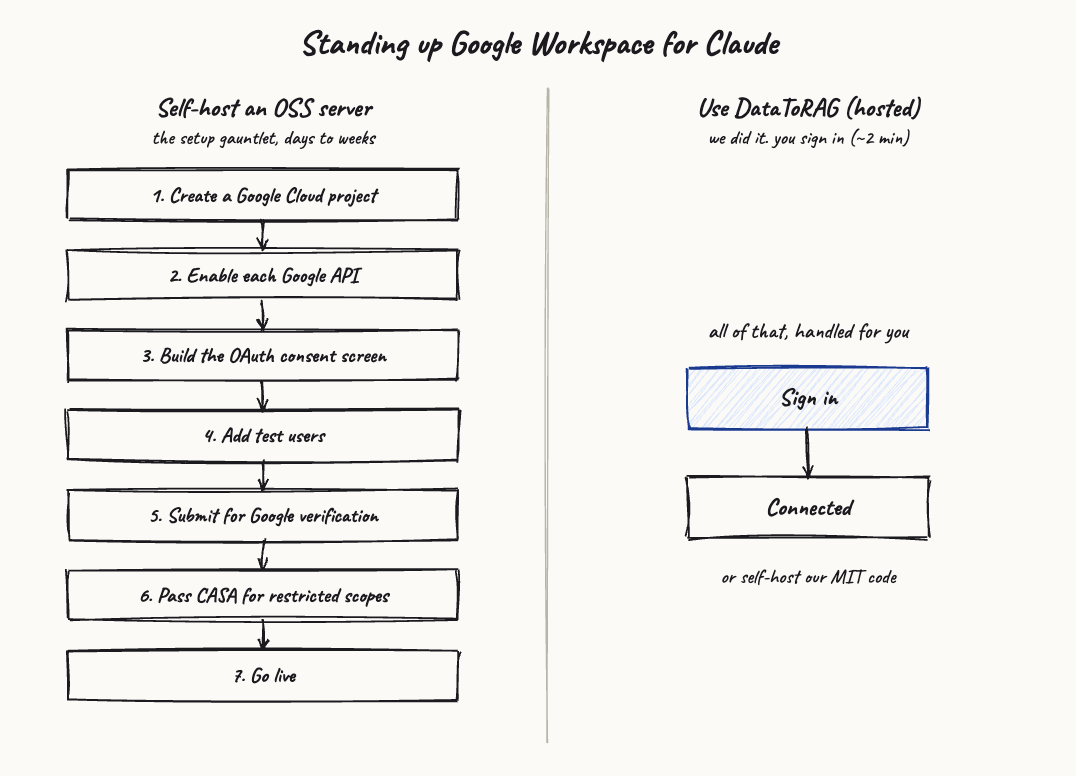
The scopes a useful Workspace MCP needs are the sensitive and restricted ones. gmail.modify to send and label mail. Full Drive and Docs access to edit files. Google treats those as restricted, which means your consent screen sits in "Testing" mode until you do something about it. In testing mode you can add yourself and a handful of test users, and it works fine for them. For everyone else, and eventually for you, Google throws up the "unverified app" warning, the screen that says this app hasn't been reviewed and might be risky. I wrote a whole piece on what that warning means and why it shows up, because we hit it too.
To clear the warning you submit your app for verification. Google wants a written justification for each restricted scope, and for some apps a demo video of the OAuth flow. For restricted scopes it also includes a security assessment called CASA. That part is not a weekend. It's a security questionnaire, a scan of your deployment, and back-and-forth with an assessor. We went through CASA Tier 2 and Google verified our app in June 2026, and I documented the whole path. When you self-host an OSS server, that work is yours, on your Cloud project, under your company's name.
Here's a data point that makes the difficulty concrete. ACI.dev, a funded integration platform, reportedly had its Gmail and Calendar OAuth blocked by Google as of mid-2026, with no workaround at the time. These are people whose full-time job is integrations, and verified Google OAuth still bit them. The verification is the hard part. The tools were never the hard part.
And then you have to run it
Say you clear all of that. You're not done. You're just live.
OAuth tokens expire. Refresh tokens rotate, and if you mishandle the rotation you get users bounced back to a re-auth screen at the worst possible moment. The first time a refresh token silently died on us, a user's Claude session started returning auth errors mid-task with no obvious cause. That's the kind of 2 a.m. page you're signing up for. We learned it the slow way and wrote up how refresh tokens actually behave. Now multiply that by every account you've connected, store all those tokens somewhere encrypted, and rotate your own client secret on a schedule.
The server also has to be up when Claude reaches for it. Run it on your laptop and it's down when the lid closes. Run it on a box and you're operating a service now: deploys, restarts, the security patch that lands next month, the dependency that breaks on a Python upgrade.
One more thing the Google-only servers don't cover: Atlassian. If half your work lives in Jira and Confluence, the OSS Workspace server does nothing for it. You're standing up a second MCP server, with its own OAuth app and its own consent screen, to reach it.
The honest comparison
This isn't open versus closed, and I want to be straight about that. We open-sourced DataToRAG under MIT too, and you can run the same code on your own infrastructure. So the real choice is "assemble and verify all of it yourself" versus "use a gateway where that's already done, hosted or self-hosted."
| Capability | Self-host an OSS server | DataToRAG (hosted) | DataToRAG (self-hosted) |
|---|---|---|---|
| Google Workspace tools | Broad: 70+ across 12 services | Deep across 8 services | Deep across 8 services |
| Atlassian (Jira + Confluence) | No | Yes | Yes |
| You run a Google Cloud project | Yes | No | Yes |
| OAuth consent and verification on you | Yes | No, we handle it (Google-verified, CASA Tier 2) | Yes |
| Multi-account under one endpoint | Yes, you wire it up | Yes | Yes |
| Token storage and rotation on you | Yes | No | Yes, on your infra |
| Hosting and uptime on you | Yes | No | Yes |
| Data never leaves your servers | Yes | No (pass-through; the gateway stores nothing, see privacy) | Yes |
| Open source (MIT) | Yes | Yes (same code) | Yes |
Notice the OSS server actually covers more Google surface than we do. It has Forms and Apps Script. We don't. I'm not going to spin that. If raw Google service count is your metric, the OSS project wins. Our argument was never tool count.
Who should self-host an OSS server
If you want total control, your data physically never leaving your infrastructure, and you have the ops capacity to run a service and shepherd a Google verification, self-hosting an open-source server is a legitimate and frankly respectable choice. A Google-only shop with a security team and a spare engineer should look hard at it. You'll spend time, not money, and you'll own the whole stack. Some teams want exactly that, and they should do it.
Who should use a gateway instead
If you don't want to run the OAuth and verification gauntlet, if your work spans Google and Atlassian both, if you want several accounts working under one endpoint without configuring impersonation yourself, or if you just want the thing to stay up and stay maintained, that's what a gateway is for. We did the Cloud project, the consent screen, the verification track, and the token handling once, so a hosted user doesn't repeat any of it.
And if you like the idea of a gateway but still want your data on your own servers, our code is on GitHub under MIT. Run it yourself with Docker Compose and Postgres. You'll still bring your own Google OAuth client, so the verification question is still yours, but you skip writing the integration from scratch and you get Atlassian and multi-account built in.
Try it
Connect your Google account at datatorag.com/dashboard and see how far you get before you'd have had to open the Google Cloud console. If you'd rather self-host, start from the repo. Either way, it's worth weighing against every other way to connect Claude to Google Workspace.
Ready to connect your data to AI?
Give Claude write access to your Google Workspace. Start free, or talk to us about your setup.
Related articles
Before we built anything for write access, we read the threads. People complain about three things: connectors that won't change existing files, OAuth that eats DIY servers, and write access that sounds reckless. Here's each one, sourced, with what we did about it.
Looking for an Open-Source Composio Alternative? Check Which Part Is Actually Open.Composio's SDKs are open source. The runtime that holds your tokens and executes your calls is not, and self-hosting it is an enterprise-plan conversation. If 'open source' means 'I can run the whole thing myself', the license on the SDK isn't the license that matters.
Zapier MCP Connects 9,000 Apps. We Went Deep on Google Workspace Instead.Zapier MCP is the widest way to hand Claude tools. Its Google Workspace actions stay shallow, though. Here's the tradeoff, and where a focused gateway wins.