
24-hour re-auth is over
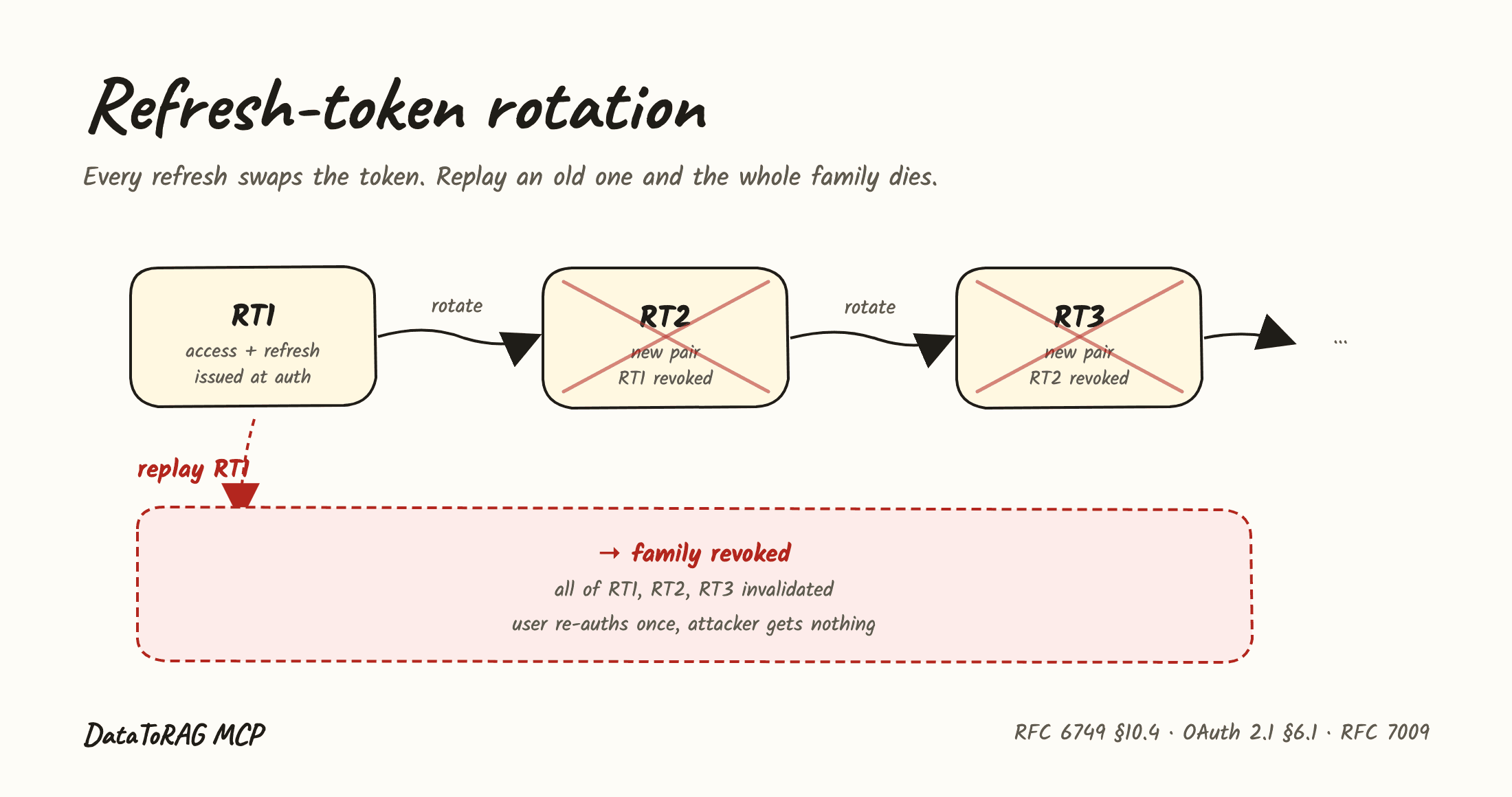
If you've been using DataToRAG MCP for more than a day, you've seen this: you sit down to work, Claude tries to call a tool, and you get bounced into a browser to re-authorize Google. Same dance, every 24 hours. It's the kind of papercut that quietly trains you to use the product less.
That's fixed now. The gateway issues refresh tokens, and any MCP client that supports OAuth 2.1 (Claude Code, Claude Desktop, Cursor) will pick them up automatically. You do nothing. The next time your session would have expired, your client gets a fresh access token in the background and keeps going.
What was actually happening
The old flow was the bare minimum the spec allows. We issued a 24-hour access token, set the expiry, and stopped there. No refresh token in the response. No refresh_token grant accepted at /oauth/token. So when the access token expired, the client had two options: prompt the user, or fail silently. Most chose to prompt.
There was no security upside to that shape. We were forcing a full Google re-consent every day to compensate for not having implemented refresh.
What changed
Three pieces, all part of the OAuth 2.1 standard shape:
The authorization_code exchange now returns a refresh_token alongside the access token. Refresh tokens have a 60-day TTL and are stored in oauth_refresh_tokens as SHA-256 hashes, not as raw values. If our database is ever read by something it shouldn't be, an attacker gets hashes, not usable credentials.
/oauth/token now accepts grant_type=refresh_token. Clients hand us the refresh token, we hand back a new access token (plus a new refresh token; see below). The user's session continues. They notice nothing.
Rotation with replay revoke. Every refresh issues a new refresh token and invalidates the old one. If a previously-used refresh token shows up a second time, that's a signal it leaked, so we revoke the entire token family, including the legitimate client's currently-active token. The legitimate user gets bumped back to the OAuth flow once. The attacker gets nothing useful. This is the pattern recommended by RFC 6749 §10.4 and the OAuth 2.0 Security Best Current Practice, RFC 9700.
We also added an RFC 7009 revocation endpoint at /oauth/revoke. Per the spec it always returns 200, even for tokens it doesn't recognize. That prevents the endpoint from being used to enumerate which tokens are valid.
Why short access + long refresh
The access token TTL will drop from 24 hours to 1 hour in a follow-up. The refresh token TTL stays at 60 days. That split looks weird at first. Why make one short and one long?
Because they're different secrets with different jobs. The access token is in every request header, every log, every memory dump, every error report. The blast radius if it leaks is high, so you want it to expire fast. The refresh token is exchanged once per access-token lifetime, in a single endpoint, over TLS. The blast radius is lower, so you can afford to keep it alive longer. And with rotation, the window any single refresh token is valid is short anyway.
Holding the access TTL at 24 hours for now lets us watch refresh telemetry under real traffic before tightening it. Once the data is clean, we drop access to 1 hour and the system is fully OAuth 2.1 shaped.
What you do
Nothing. If your client supports OAuth 2.1 refresh (Claude Code, Claude Desktop, Cursor all do), it will discover the new refresh_token grant type via our /.well-known/oauth-authorization-server metadata and start using it on its next token exchange.
If you're still on a token issued before today, your client will re-auth one more time to pick up the new pair, then refreshes silently from there.
For developers
The design record for how tokens are issued, rotated and revoked lives in the repo, with the threat model and the reasoning behind the family-revoke decision:
This post originally linked a spec and an implementation plan that have since moved out of the public repo, so those links are gone rather than left to rot.
If you're building an MCP server of your own, the headline lesson is: don't ship the bare minimum auth shape. The refresh-token grant isn't optional ergonomics, it's the difference between a tool people use and a tool people give up on.
Ready to connect your data to AI?
Give Claude write access to your Google Workspace. Start free, or talk to us about your setup.
Related articles
Before we built anything for write access, we read the threads. People complain about three things: connectors that won't change existing files, OAuth that eats DIY servers, and write access that sounds reckless. Here's each one, sourced, with what we did about it.
We Stopped Building and Deploying on the Production BoxSince the start, the server that runs DataToRAG also built every release of DataToRAG, from a git checkout sitting next to the secrets. Now GitHub builds the image, a person approves the deploy, and the box can do exactly one thing when asked: pull a named image and swap it in. Here is what we built, what we found on the way, and what we decided not to build.
How a File Should Move Through an MCP Server (and Why Ours Never Sees the Bytes)We designed Gmail attachments three ways and built one. What we learned about base64 and tokens, what Claude actually hands a tool when you drop a PDF into the chat, and where the MCP spec is heading, is worth more than the feature.