
AI-Powered Email Workflows with the Gmail Draft Tool
Most AI email integrations work the same way. You describe what you want, the AI writes it, and the email goes out. For quick replies, that's fine. For a message to your biggest client about a contract change? You probably want to read it first.
We've been using Claude with Gmail through the Google Workspace MCP for months now. The pattern that actually stuck wasn't "write and send." It was "write, review, revise, then send." That's why we built gmail_create_draft and gmail_update_draft.
The copy-paste workaround
Before drafts, the best you could do was ask Claude to write an email and then copy the output into Gmail yourself. People do this all the time.
It works. Sort of. You lose threading. You have to manually add recipients, subject lines, CC fields. If the email is part of an ongoing conversation, you need to find the right thread and hit reply yourself. The AI did 80% of the work, then you spent five minutes on the last 20%.
How the draft workflow actually works
Here's what it looks like now:
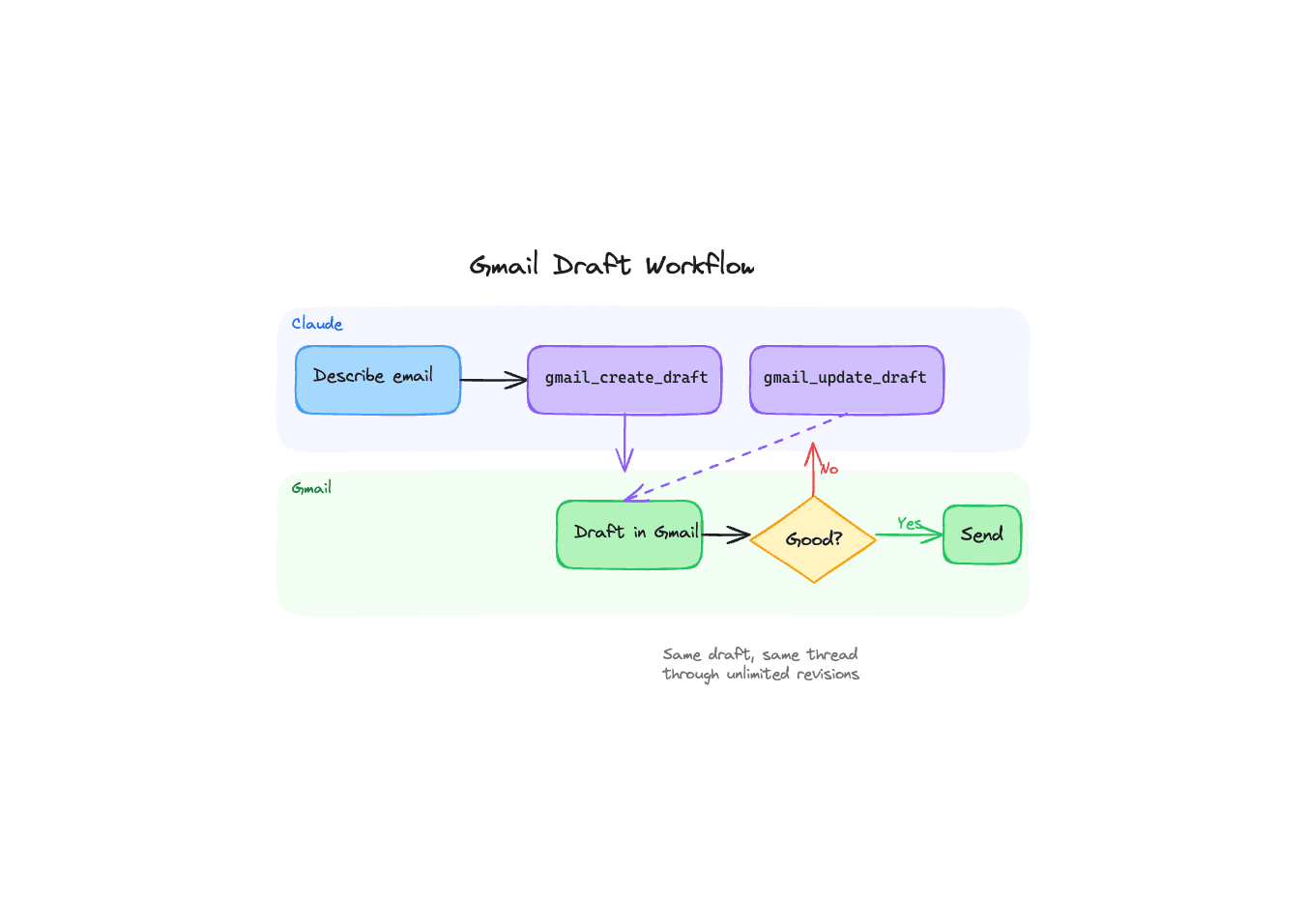
You tell Claude something like "draft a reply to Sarah's email about the Q2 budget review, push back on the timeline but keep it collaborative." Claude calls gmail_create_draft. A real Gmail draft appears in your drafts folder, with the recipients and subject already filled in. It lands as its own draft rather than inside Sarah's thread, which is worth knowing before you go looking for it there.
Open Gmail. Read it. Maybe the tone is too soft, or you want to add a specific number. Tell Claude "make the pushback more direct, and mention that we need the revised numbers by April 18th."
Claude calls gmail_update_draft. Same draft, edited in place. Just better. You're not starting over, and you're not managing draft IDs yourself (Claude handles that).
When it reads right, hit send from Gmail. Done.
Why update matters more than you'd think
The easy version of this feature would have been: delete the old draft, create a new one. We tried that first. The problem is threading.
Gmail threads are tied to message headers. When you delete a draft and create a fresh one, the new draft can lose its association with the original conversation. Your carefully threaded reply becomes a standalone email sitting in drafts with no context.
gmail_update_draft solves this by modifying the existing draft in place. It reads the current draft's thread ID automatically if you don't pass one, so the thread stays intact through as many revisions as you need. Three rounds of edits, five rounds, doesn't matter. Same draft, same thread.
Where this gets interesting
The obvious use case is one-off emails that need a human eye. But the draft workflow opens up a few patterns we didn't originally plan for.
Batch drafting. "Go through my last 10 unanswered emails and draft replies for each one." Claude creates 10 drafts. You spend 15 minutes reviewing them instead of 45 minutes writing them. Some need edits, some are good as-is. You send them in a batch.
Multi-stakeholder review. Draft an email, share the draft link with your manager, get feedback, ask Claude to incorporate it. The draft is the collaboration surface.
Follow-up sequences. "Draft a follow-up to the partnership email I sent last Tuesday. Reference the pricing doc I shared." Claude finds the thread, reads the context, and drafts something that sounds like a continuation of the conversation. Because it is one.
Sensitive communications. Legal, HR, client escalations. Anything where the cost of getting it wrong is high. The draft workflow is a forcing function for human review without adding friction.
The bar for AI email tools is low
Most integrations treat email as a one-shot generation problem. That made sense two years ago when the goal was just "can AI write an email at all?" It doesn't make sense now.
People don't write important emails in one pass. They write, reread, edit, sometimes sleep on it. The tools should match that reality. Drafts aren't a workaround. They're the workflow.
The gmail_create_draft and gmail_update_draft tools are live now in the Google Workspace MCP. Connect your account, and every draft Claude creates shows up in your Gmail, ready for review.
Ready to connect your data to AI?
Give Claude write access to your Google Workspace. Start free, or talk to us about your setup.
Related articles
Gmail send, reply, forward and drafts take attachments from Drive: real files attached, Google Docs linked the way Gmail does it or exported as PDF and Word, images inline. The design question underneath is one the MCP spec itself hasn't settled yet, and we picked a side.
Claude Can Send Formatted Email Now. Here's What That Took.Until August 26, our Gmail tools sent every message as plain text, so asking Claude for a formatted email got you literal HTML tags in your inbox. Here's the fix, the one asymmetry to know about, and where the workflow builders stand.
Hosted Google Workspace MCP: DataToRAG vs Google's Official Servers vs Claude's Native ConnectorsGoogle shipped eight official Workspace MCP servers. Claude has three native connectors. We host one endpoint. Every tool on all three, enumerated on August 24, 2026, including the surprise: Google's own Gmail MCP cannot send email.