
Save Gmail Attachments to Drive with Claude
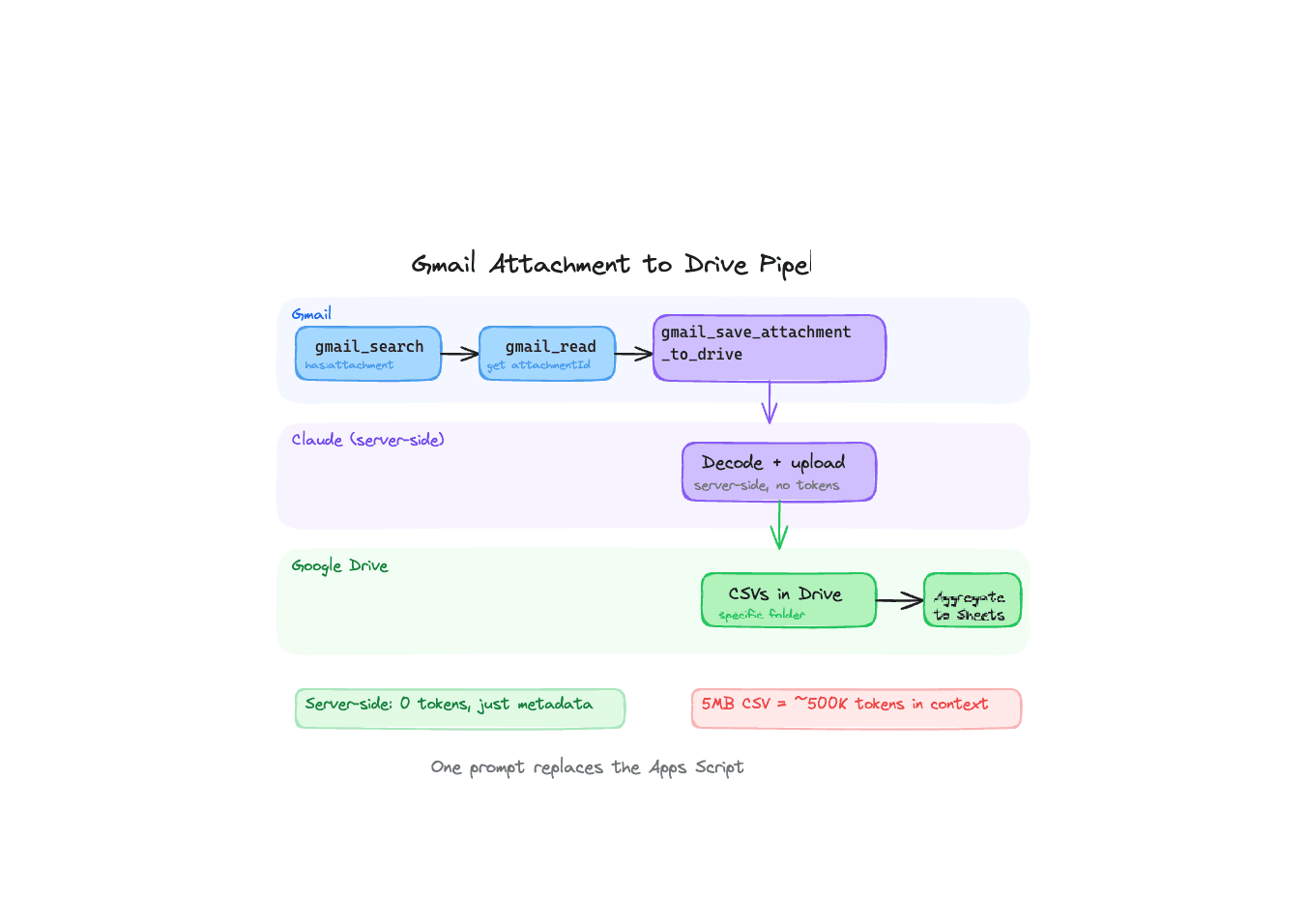
Someone on our early access list had a workflow that looked like this: a colleague scheduled 6 Domo reports to arrive by email at 4am every weekday. Each email had a CSV attachment. An Apps Script would save those attachments to a specific Google Drive folder. Then a Claude skill would pick up the 6 CSVs, aggregate them into one Google Sheet, and write a summary. Another sheet pulled the summary via IMPORTRANGE.
It worked. But the Apps Script was a separate piece of infrastructure to maintain, debug when the email format changed, and explain to the next person who inherited the workflow.
We built gmail_save_attachment_to_drive so Claude can handle the entire chain.
How it works
The tool does exactly what the name says. You give it a message ID, an attachment ID, a filename, and optionally a Drive folder ID. It pulls the attachment from Gmail, uploads it to Drive, and returns the file metadata including a direct link.
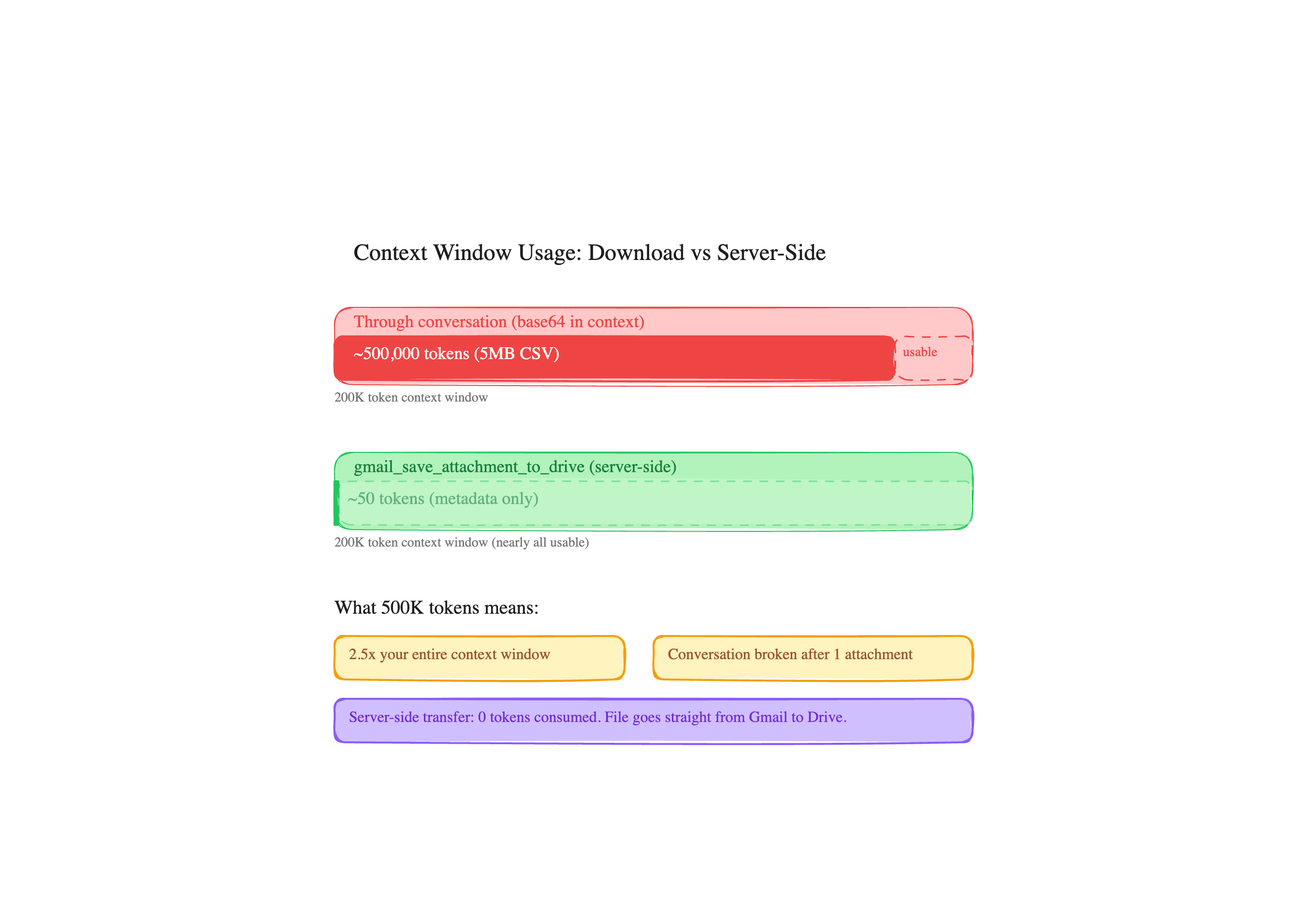
The actual data never touches the conversation. The attachment is decoded and uploaded server-side. A 50MB Excel file doesn't eat your context window. You get back a file ID and a link.
The workflow, step by step
Here's what it looks like in practice, using the Domo report scenario.
Step 1: Find the emails. "Search my Gmail for emails from [email protected] with attachments from today." Claude calls gmail_search with from:[email protected] has:attachment newer_than:1d. You get back 6 matching messages, each with its id, sender, subject, date and a snippet.
Step 2: Read the attachments. For each message, Claude calls gmail_read to get the full message. The response includes a parts array with attachment metadata: filename, MIME type, and an attachmentId. No binary data at this point, just metadata.
Step 3: Save to Drive. Claude calls gmail_save_attachment_to_drive for each attachment. If you want them in a specific folder, you mention it once ("save them to the Domo Reports folder") and Claude calls drive_search to find the folder ID, then passes it as parent_folder_id on each save.
Step 4: Process the data. Now the CSVs are in Drive. Claude reads them with drive_read_file, aggregates the data, writes the summary to a Google Sheet with sheets_update. Done.
One prompt triggers the whole thing. No Apps Script. No cron job. No separate infrastructure.
Why not just download and re-upload?
Before this tool existed, the workaround was: read the email, ask Claude to extract the attachment data, then create a new file in Drive. The problem is that attachment data is base64-encoded, and sending it through the conversation means it lands in your context window.
A 5MB CSV encoded in base64 is about 6.7MB of text, and since base64 is plain ASCII that is roughly 6.7 million characters. Base64 packs badly into tokens, so you are well over a million of them. Your context window is gone after one attachment.
gmail_save_attachment_to_drive bypasses this entirely. The server fetches the attachment, decodes it in memory, uploads to Drive, and cleans up the temp file. The only thing that flows through the conversation is metadata: file IDs, names, and links.
Folder targeting
Most people don't want files dumped in the root of My Drive. The parent_folder_id parameter lets you specify exactly where files go.
In practice, you don't need to know folder IDs. Just say "save it to the Q2 Reports folder" and Claude will search Drive for a folder with that name, get the ID, and pass it through. If the folder doesn't exist, Claude can create it with drive_create_folder first.
What this replaces
The Domo example is one case. Here are others we've seen:
Invoice processing. "Go through my unread emails from vendors, save any PDF attachments to the Invoices folder, and list what you saved." Accounts payable runs this once a day instead of manually downloading and uploading each invoice.
Contract collection. "Find all emails from [email protected] in the last 30 days, save any Word or PDF attachments to the Partner Contracts folder." Legal review prep that used to take an hour of clicking.
Daily data drops. The original use case. Scheduled reports arrive by email, get saved to Drive, get processed into dashboards. The entire pipeline runs on a single prompt.
Try it
The gmail_save_attachment_to_drive tool is live now in the Google Workspace MCP. Connect your account and try: "Find my most recent email with an attachment and save it to Drive."
If you're running scheduled reports through email like the team above, you can replace the Apps Script today. One less thing to maintain.
Ready to connect your data to AI?
Give Claude write access to your Google Workspace. Start free, or talk to us about your setup.
Related articles
Most AI email tools generate and send in one shot. We built a draft workflow instead, because anything that matters deserves a second look before it leaves your outbox.
Your Agent Can Attach Files to Email Now. The Interesting Part Is Where the Bytes Never Go.Gmail send, reply, forward and drafts take attachments from Drive: real files attached, Google Docs linked the way Gmail does it or exported as PDF and Word, images inline. The design question underneath is one the MCP spec itself hasn't settled yet, and we picked a side.
Claude Can Send Formatted Email Now. Here's What That Took.Until August 26, our Gmail tools sent every message as plain text, so asking Claude for a formatted email got you literal HTML tags in your inbox. Here's the fix, the one asymmetry to know about, and where the workflow builders stand.