
Claude Can Read Your Google Docs. It Can't Edit Them.
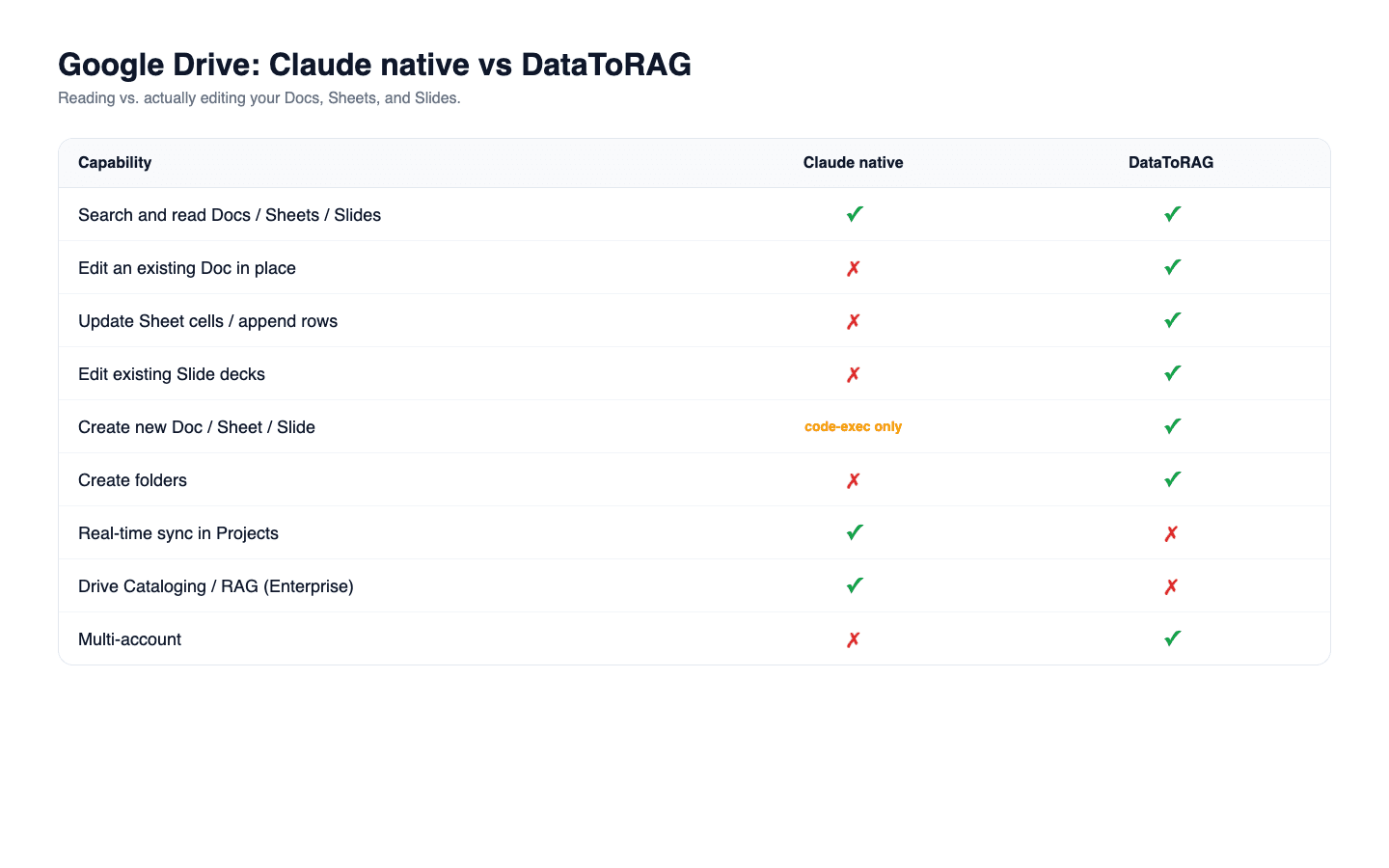
Short answer: no, Claude's native Drive connector cannot edit an existing Google Doc. As of October 9, 2026 it reads, searches, copies and creates files, including new Docs and Sheets with content in them, and it can rename, move or trash a file, but nothing in its tool surface changes what is inside a document that already exists. DataToRAG edits Docs, Sheets and Slides in place.
Ask Claude to read your quarterly report in Google Docs. It reads it. Ask Claude to fix the typo in paragraph three. It can hand you the corrected text, or even put that text in a brand new document. What it cannot do is fix the typo in the document you asked about.
That's the shape of the native Google Drive connector in Claude. Read any Google Workspace file, edit none of them.
The specifics: Claude reads Google Docs directly, exports Sheets to CSV so it can parse the cells, and exports Slides as plain text so it can extract the content. Creating is a first-class part of that surface, and this post used to undersell it. The connector makes new Docs, Sheets, presentations and folders on its own, and text you give it converts into a real Google Doc, so "it can only hand you text" is not the limit.
The limit is narrower and it does not move: any content it writes goes into a NEW file. It can rename a file you already have, move it to another folder or put it in the trash, and that is as far as it reaches into one. Comments on existing documents, edits to a sentence, appending a row to a sheet, fixing a typo on slide 4. None of that happens from the connector, because no tool in it opens a file you already have and changes what is in it. A created presentation is the sharpest version of this, since it arrives with one empty slide and nothing in the native surface can put a word onto it.
DataToRAG's connector reads the same surfaces and writes back to every one of them.
Feature comparison
| Capability | Claude native Google Drive | DataToRAG Google Workspace |
|---|---|---|
| Search and read Google Docs, Sheets, Slides | Yes | Yes |
| Edit an existing Google Doc in place | No | Yes |
| Update Sheet cells or append rows | No | Yes |
| Edit an existing Slides deck | No | Yes |
| Create a new Doc or Sheet, with content | Yes | Yes |
| Create a new Slides deck | Yes, but it arrives empty | Yes, with content |
| Create folders in Drive | Yes | Yes |
| Copy an existing file | Yes | Yes |
| Rename a file | Yes | Yes |
| Move a file to another folder | Yes | No |
| Read a file's sharing permissions | Yes | No |
| Add comments to files | No | No |
| Real-time sync of Docs in Claude Projects | Yes | No |
| Drive Cataloging / RAG indexing (Enterprise) | Yes | No |
| Multi-account (work + personal Google) | No | Yes |
The write side of the connector
docs_create: create a new Google Doc, optionally with initial content.docs_write: write or replace the content of a document.docs_batch_update: apply a sequence of programmatic edits (insert, delete, format) to an existing Doc.sheets_update: write values to specific ranges.sheets_append: add rows at the end of a sheet.sheets_create: create new sheets seeded with data.slides_create: create decks from a structured spec.slides_batch_update: edit existing decks (change text, update shapes, swap content).drive_create_folder: organize, don't just dump files at the root.
The difference isn't "more tools." It's that a workflow that starts with reading a doc can end with editing that same doc. The conversation doesn't have to terminate in "here's the output, go paste it yourself."
Three workflows that become possible
Doc editing. Read a Google Doc, fix typos, restructure sections, and save the changes back to the same doc. One source of truth. No fork of the text floating around in a chat transcript.
Sheet automation. Pull numbers out of an email, append a row to a tracking sheet, update another cell that feeds a dashboard. A weekly-report workflow that runs end to end with zero copy-paste.
Deck updates. Read a slide deck, change "Q1" to "Q2" everywhere, update three data labels, swap a title. Claude's Drive connector reads the text of the deck. Ours rewrites it in place.
What Claude's Drive connector is good at
Reading, searching and starting things. If all you want is "summarize this 40-page contract," "find the doc where we agreed on the new pricing," or "draft this up as a new doc in my Drive," the native connector handles it cleanly, cites sources, and syncs Docs added to a Project in real time. It also moves files between folders and can tell you who a file is shared with, neither of which we do. The limitation only hurts when the thing you want to change already exists.
Enterprise users also get Drive Cataloging, which indexes content with RAG for fuzzy search across a large corpus. DataToRAG doesn't do that. If your workflow is "search across 50,000 documents," Claude Enterprise is the right tool.
If your workflow is "read one doc, change three sentences, save," DataToRAG is.
The prompt that reveals the gap
Try this: "Read my Q2 roadmap Doc, add a new section titled 'Customer feedback themes,' and list our top five themes from recent customer emails."
On the Drive connector, the best you get is that section in a new document, with your roadmap Doc untouched. On DataToRAG, the answer is the roadmap Doc itself, updated, with a link.
Try it
Connect your Google account at datatorag.com/dashboard.
Ready to connect your data to AI?
Give Claude write access to your Google Workspace. Start free, or talk to us about your setup.
Related articles
Google shipped eight official Workspace MCP servers. Claude has three native connectors. We host one endpoint. Every tool on all three, enumerated on August 24, 2026, including the surprise: Google's own Gmail MCP cannot send email.
The Spreadsheet Was Correct. Nobody Could Read It.Writing values into Google Sheets gives you no formatting at all, and the failure is invisible to whoever caused it. Four new tools fix that: a one-call readable pass, targeted styling, a raw escape hatch, and row lookup that doesn't read the whole sheet.
Reading a Spreadsheet Is Not Reading DataAn agent can read a rendering of your spreadsheet or it can read the cells. They look identical right up until they disagree, and you won't be watching when they do.