
Your Agent Should Ask For What It Needs
There is a failure mode in AI agents that looks exactly like success.
You ask the agent to do something real. It replies. The reply is articulate, well-organised, and completely empty, because the agent has no connection to your data, so the only thing it can actually do is talk about what it would do if it did.
Nothing errors. Nothing warns you. You get a confident paragraph instead of the work.
Connecting and using are two separate steps, and nothing was bridging them
The shape of the problem is mundane once you see it.
A user arrives, and there are two things they need to do: connect an account, and ask the agent for something. Those live in different places. Some people connect an account and never open the agent, so the connection does nothing. Others open the agent immediately and never connect anything, so the agent can only talk.
Both groups did something reasonable. Both got nothing. And the product accepted each one without ever pulling them the other way.
The usual fix is a checklist, or a setup wizard, or a modal that blocks the interface until you comply. We didn't want any of those. A gate interrupts someone who is already moving, and a link to a settings page loses the thread they were in the middle of.
The fix: the agent asks, in the conversation, and then finishes the job
Now when the agent needs a connection it doesn't have, three things happen.
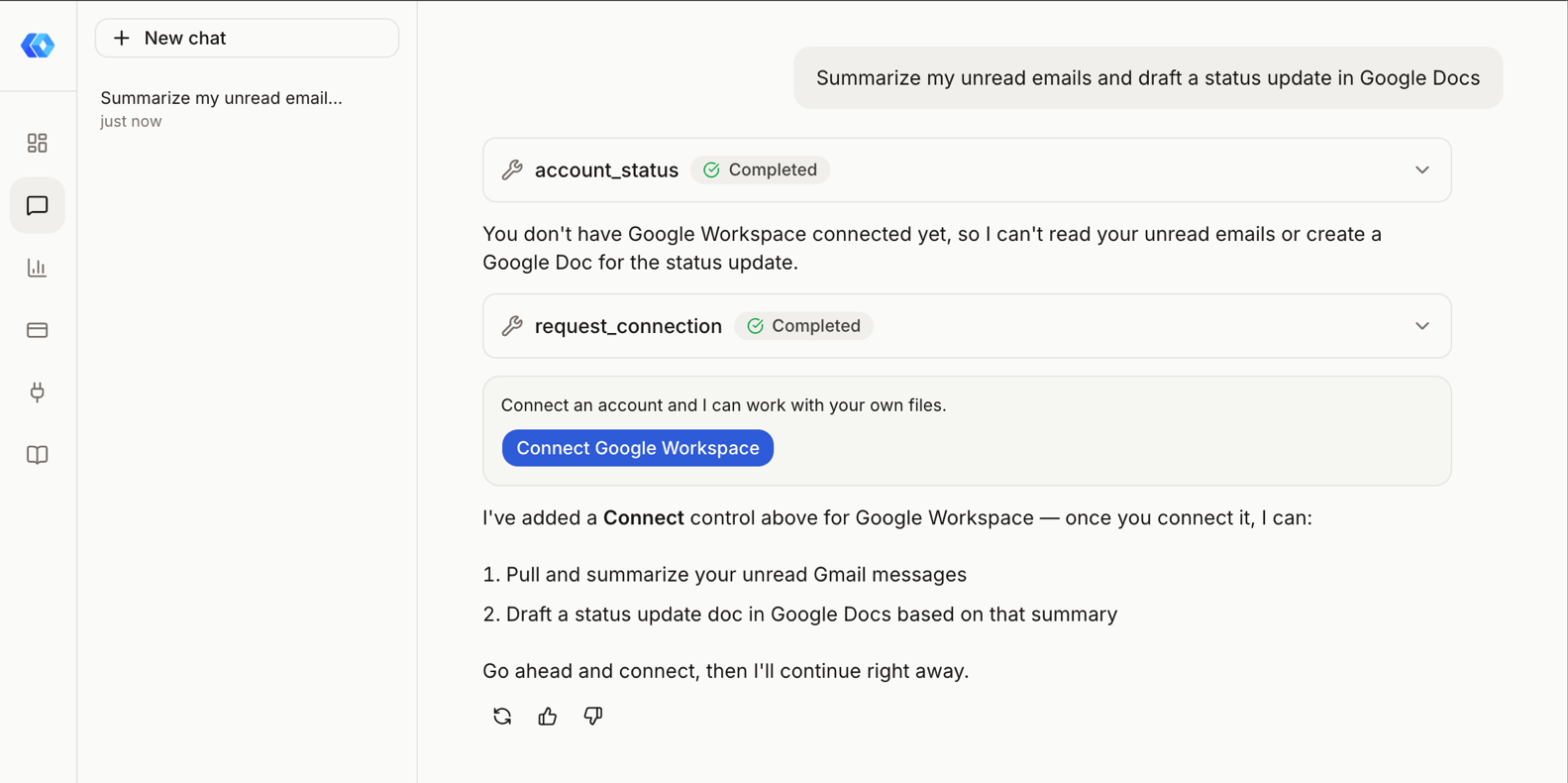
It says so plainly. Not an error, not a silent shrug. It names the specific thing it needs and why the request can't proceed without it.
The connect control appears inline, as a message in the thread. Not a modal over the conversation. Not a redirect to a settings screen. A card in the conversation you were already having, where the request you made is still sitting on screen above it.
And when you connect, the agent picks up your original request by itself. This is the part that makes it a conversation rather than a form. You don't come back and re-type what you wanted. The thread resumes and the work happens.
The hard part was not the asking
Building a card that says "connect your account" is trivial. The difficulty is everything around it.
Google's consent screen is a full page navigation away from your app. You leave, you authorise, you come back, and by default you come back to a fresh page with no memory of what you were doing. The request that triggered the whole thing is gone, and the user is left looking at an empty agent wondering whether it worked.
So the interesting engineering is in the return trip:
- Persistent threads, so there is something to come back to.
- A validated return path, so the round trip lands you in the same conversation rather than a generic dashboard, and validated carefully, because "send the user wherever this parameter says" is one of the oldest ways to build an open redirect.
- A continuation that fires exactly once, so the agent resumes your request without you asking twice, and without it looping.
We chose a full redirect over a popup, deliberately. Popups get blocked, behave differently on mobile Safari, and can lose their handle to the opener depending on browser policy, all of which fail on a stranger's browser you cannot test. A redirect has none of those failure modes. It costs one page load, and the thread rehydrates on the other side.
What it does now
Asked to summarise unread email and draft a status document, on an account with nothing connected:
- The agent checked what was connected, found nothing, and said so.
- It rendered the connect card inline.
- On connecting, it resumed the original request, not a fresh one.
- It read the inbox, summarised it, created the document, and wrote the content.
Both halves of a two-part request survived the OAuth round trip. That was the acceptance test, and it is the part most likely to break quietly: it is easy to resume a conversation and lose what was actually being asked.

Why we think this is the right default
An agent that can only talk is worse than an agent that refuses, because talking looks like working. The user has no way to tell the difference between "I did the thing" and "I described the thing", and they will usually assume the former until something downstream is missing.
Asking is a smaller feature than it sounds and a bigger one than it looks. It turns a dead end into a next step, in the place where the user already is.
If you are building an agent on top of anyone's data, the general lesson holds regardless of what you build on: make the agent name what it is missing, ask for it where the user already is, and then finish what they asked. All three, or you have built a nicer dead end.
Ready to connect your data to AI?
Give Claude write access to your Google Workspace. Start free, or talk to us about your setup.
Related articles
Two new tools complete the draft lifecycle, and Gmail reads got a compact mode that cuts a typical email to 2% of its former size.
Your Agent Can Attach Files to Email Now. The Interesting Part Is Where the Bytes Never Go.Gmail send, reply, forward and drafts take attachments from Drive: real files attached, Google Docs linked the way Gmail does it or exported as PDF and Word, images inline. The design question underneath is one the MCP spec itself hasn't settled yet, and we picked a side.
The Model Didn't Hallucinate. Our Tool Description Was Missing.We read the failed calls on a real account and found something uncomfortable: most of them were not the model getting it wrong. They were our tool descriptions failing to say what the tool could do, and in one case failing to offer something it should have offered.