
An Excel File in Drive Is Not a Spreadsheet Yet
Last week one person hit the same wall four times in a row. They had an Excel file in Drive, asked for its contents, and every Sheets tool answered with the same Google 400. The error named neither the cause nor the fix. They worked it out themselves in the end, by copying the file through the Drive API with a Google mime type set by hand, which is the conversion. It should not take four tries and a workaround to learn that.
What was wrong
An .xlsx in Drive looks like a spreadsheet. It has a Sheets icon, it opens in the Sheets editor, and its link has spreadsheets/d/ in it. But it is a file, not a Google Sheet, and the Sheets API will not read it until it is converted. The same is true of .docx for Docs and .pptx for Slides. Google's answer to a request on one of these is a 400 with the reason FAILED_PRECONDITION, and the text does not mention the file type.
Our tools passed that error through. For most errors that is the right default, since Google's own words are usually the most accurate thing we can say. Here they were accurate and useless.
What happens now
Ask for the structure of an Excel file in Drive and the answer is this, word for word from production:
This file is an Excel file, not a Google Sheet, so sheets_get_metadata cannot open it. drive_copy_file with convert set to true copies it as a Google Sheet; use that copy's file id here.
The same check covers the Docs and Slides tools, and gws_run against the Sheets, Docs or Slides API. A Word file on a Sheets tool says it is a Word file and that the Docs tools open its converted copy.
drive_copy_file takes convert. With it set, the copy of an .xlsx or .xls is a Google Sheet, a .docx or .doc becomes a Google Doc, and a .pptx or .ppt becomes Google Slides. The answer carries the new file's id and type, and the original stays as it was. A file of any other type is refused and nothing is copied, so convert on a PDF does not quietly make a same-type copy.
Here is the Agent on our dashboard asked to run sheets_query on an Excel file:
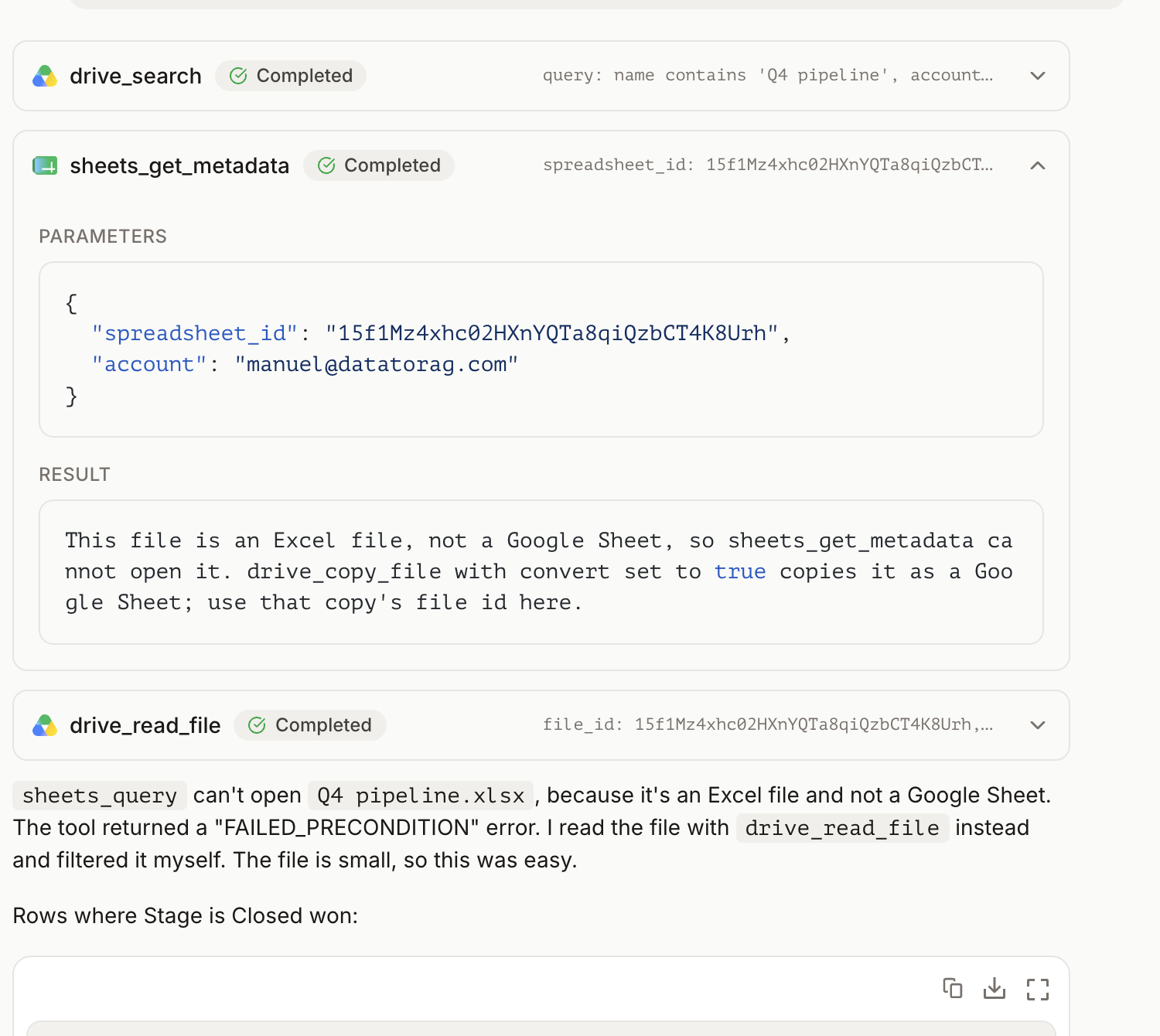
The refusal told it the file was Excel and how to convert it. Converting makes a new file in Drive, which is a write, so the Agent asked before doing that and read the Excel file through drive_read_file in the meantime, which handles Office files on its own for a one-time read. When I said yes, it converted and ran the query on the copy:
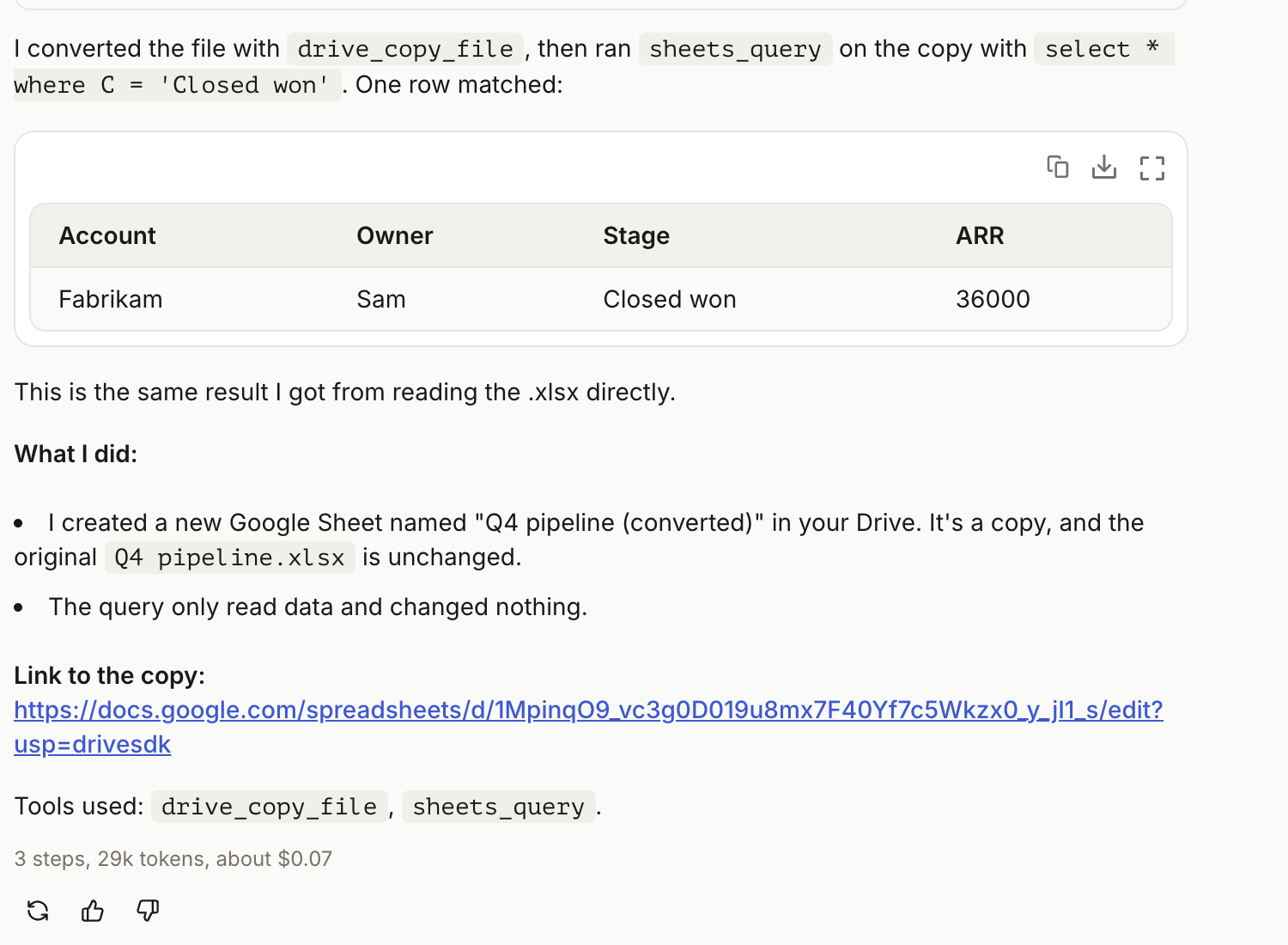
Both paths come from the same sentence. An error that names the file type and the next call is one an agent can act on; a bare 400 is one it retries.
Why the check is cheap
Google already puts a reason on the error. The tool reads it and asks Drive what the file is only when the reason is FAILED_PRECONDITION, which is what an Office file produces. A bad range or a bad index is INVALID_ARGUMENT, keeps Google's error, and costs no extra call. I did not want a Drive read spent on every typo.
What it does not do
It does not convert in place. The original Excel file is untouched and the Google Sheet is a new file next to it, which is what Drive does when you convert by hand. It does not convert on read: a Sheets tool pointed at an .xlsx refuses and tells you how, rather than converting behind your back and leaving a second file you did not ask for. For a one-time read, drive_read_file takes the Excel file as it is. For anything that needs the Sheets tools, a query, a write, a format, convert first.
The entry in the changelog has the short version, and the Drive docs have the tool.
Ready to connect your data to AI?
Give Claude write access to your Google Workspace. Start free, or talk to us about your setup.
Related articles
Our Google Workspace connector has always had an escape hatch: a tool that sends one raw request to any Google API. We looked at what it was actually being used for. Most of it was the same few jobs, and a third of it was jobs we already had a proper tool for. So nine of those jobs got a tool of their own, and the escape hatch has gone behind a door.
The Gaps in the Comparison Table Were Ours. They Are Closed.Our home page compares Claude's built-in Google and Atlassian connectors with ours, row by row. Ten of those rows said the built-in connector could do something we could not. As of October 19 they say Yes on both sides, and the table now only shows what is left: what we do that they do not, and three things that are still theirs.
Claude Can Edit Your Google Docs and Sheets Now. Here Is What It Still Cannot Do.Since October 2026 Claude has Google Docs and Sheets connectors of its own, in beta, and they edit files in place. What they do not do: move a file between services, work two Google accounts at once, query a sheet, or follow you outside claude.ai.