
Claude Can File an Email on a Jira Issue Now, Without the Email Going Through Claude
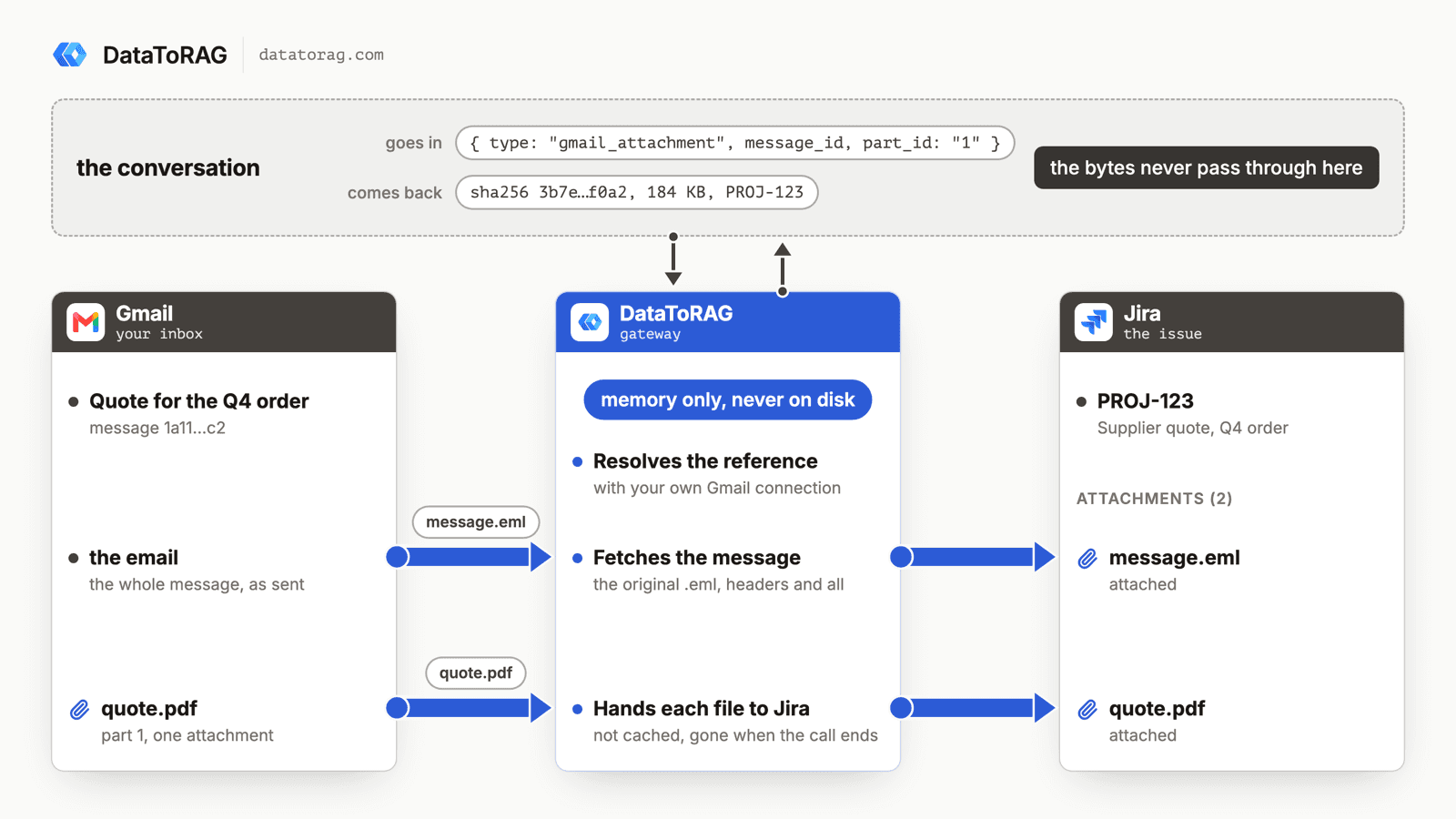
A customer on the Pro plan has a compliance rule: every email that matters to a ticket has to sit on the Jira issue as the original message file, the raw .eml, not a summary and not a screenshot. Until last week his way of doing that was to have Claude drive Chrome: open the message, download it, open the issue, upload it. It worked, and it took a browser session for every single email.
He asked whether the connector could do it directly. Two weeks later it can, in two stages, and the second stage is the one he actually wanted.
Stage one: the email itself
jira_add_attachment takes the issue key and a reference to a Gmail message, and the message lands on the issue as its original .eml. That is the file exactly as Gmail returns it in raw form, headers and all, so it is the thing a compliance audit wants and not our rendering of it.
{
  "issue_key": "PROJ-123",
  "file": { "type": "gmail_message", "message_id": "<message id>" }
}
He tested it the day it shipped, said it did the job, and asked the obvious next question.
Stage two: the attachments inside the email
Most of the emails he files carry PDFs, and those need to be on the issue as separate files, under their own names. Stage one gave him the .eml, which contains the PDFs, but Jira does not open an .eml to show you what is inside. So the detour was back: save the attachment to Drive, download it, upload it.
Now the same tool takes a second kind of reference, one attachment of a message:
{
  "issue_key": "PROJ-123",
  "file": { "type": "gmail_attachment", "message_id": "<message id>", "part_id": "1" }
}
The file arrives on the issue with the sender's file name and type. He ran it on a real ticket the next morning and the browser detour is gone from his day.
One thing worth knowing if you build on this. The attachment is named by its part id, not its attachment id. Gmail issues a fresh attachment id every time a message is read, so an id you copied out of one read does not match the next. The part id is the attachment's position in the message ("1", "0.1") and it stays put. gmail_read lists it beside each attachment now, which is the small change that made stage two possible.
Where the file is while it moves
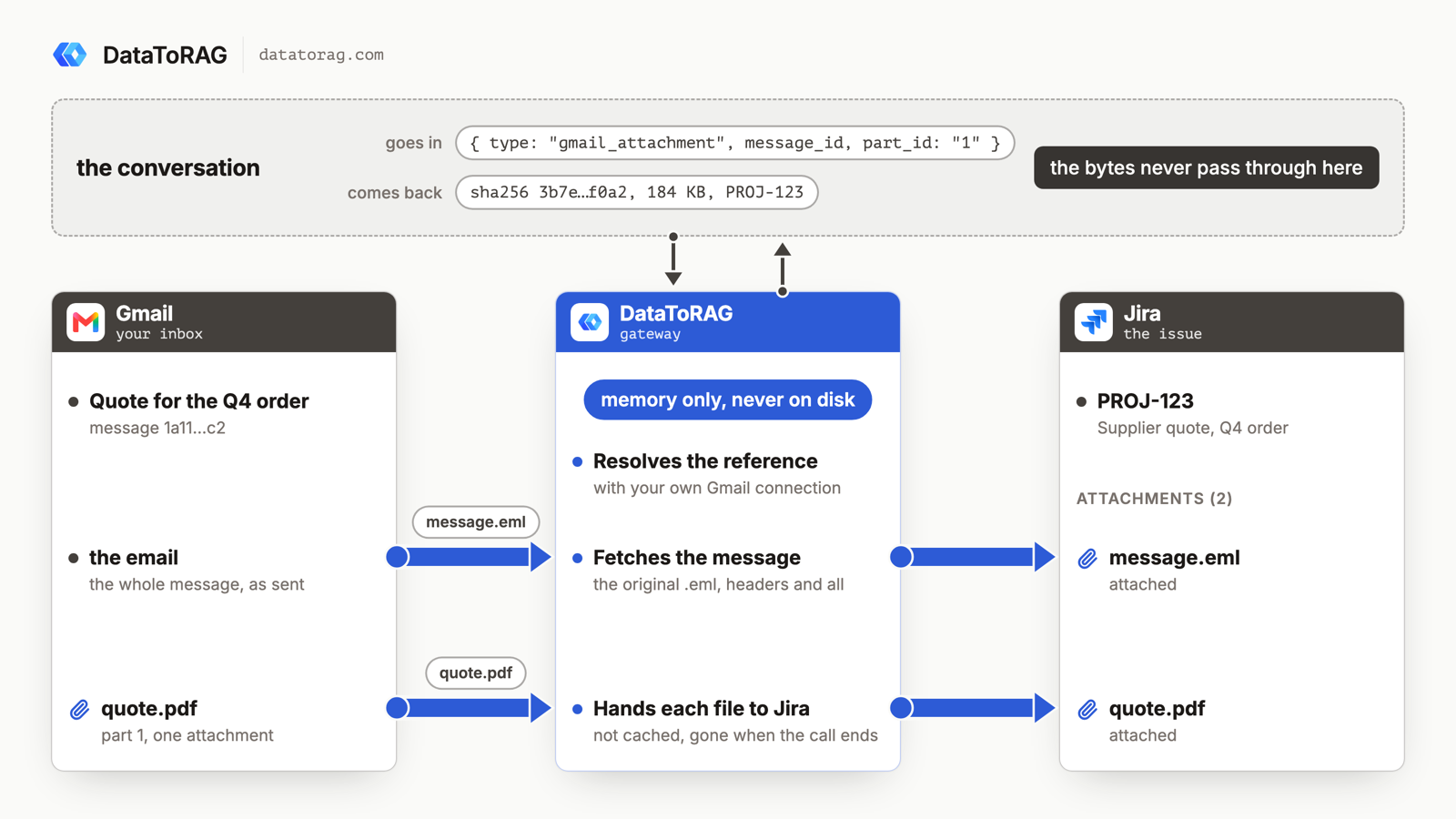
This is the part I care about more than the feature. The file never enters the conversation. Claude does not read it, base64 it, or paste it into a tool argument; a 20 MB PDF pushed through a context window as text is somewhere around 7 million tokens and a bill nobody wants, and I wrote about why that road is a dead end when we did Gmail attachments from Drive. Claude passes a name for the file, and the gateway fetches it from Gmail and hands it to Jira in one motion.
While that runs, the file is held in the gateway's memory only. It is not written to our disks, not copied to Drive, not cached. When the call ends it is gone from us, and it exists in exactly the two places you'd expect: the email it came from and the issue it went to.
The tool answers with a receipt rather than "ok": the attachment's name and size as Jira reports them, the SHA-256 and byte count of what we sent, and the issue's key, project and summary. Jira does not hand back a hash of what it stored, so the receipt shows that the sizes agree, not that the stored bytes were compared. I would rather say that plainly than imply a check we cannot make.
The shape, because it will come up again
A file reference is a small object that says where a file lives in one of your connected services. It is a name for the file, not the file. gmail_message and gmail_attachment are the first two types; a Drive file, a Confluence attachment and a Jira attachment going the other way all fit the same shape, and so does any tool that takes a file.
The reference can only be resolved with your own connection to the service it names, so a reference you did not have access to is just a string. And one call moves one file. An email with three PDFs is three calls. We cut a batch form from the first version to keep the receipt honest, one file, one hash, and will add it when someone's emails start arriving with ten attachments.
The docs page is Moving files between services. The changelog entries are stage one and stage two.
What it took
Two connectors that did not know about each other. The Gmail side learned to resolve a message or a part into a stream; the Jira side learned to take a stream and attach it; the gateway in between learned what a file reference is and which connector resolves which type. Neither connector imports the other, which is the property that lets the next reference type land without touching Jira.
If you have a workflow where a file is still taking a detour through your downloads folder, tell me which two services. That is the list we build from.
Ready to connect your data to AI?
Give Claude write access to your Google Workspace. Start free, or talk to us about your setup.
Related articles
Gmail send, reply, forward and drafts take attachments from Drive: real files attached, Google Docs linked the way Gmail does it or exported as PDF and Word, images inline. The design question underneath is one the MCP spec itself hasn't settled yet, and we picked a side.
How a File Should Move Through an MCP Server (and Why Ours Never Sees the Bytes)We designed Gmail attachments three ways and built one. What we learned about base64 and tokens, what Claude actually hands a tool when you drop a PDF into the chat, and where the MCP spec is heading, is worth more than the feature.
Skills Are Live: The Routines I Kept Rebuilding by Hand, Now One ClickEleven published routines for Gmail, Calendar, Drive, Docs, Sheets and Jira. Copy one into Claude or press Run in the dashboard. Here is what the morning brief does, what it cost us to make it finish, and why it never asks you a question.